Spring Cleaning includes Hardware, Software, and Password Management
While many of us look to closets and drawers we store things we never expect to see again, there are few who think about the hidden corners of our technology where dust, dirt, and crummy things (like destructive viruses) can live in wait for their turn to take down our work. We’ll help you with best practices for keeping your passwords and technological life in tip-top shape!
A clean sweep for your computer is a must-do for authors
Every writer should start off the year knowing their work is protected and their work tools are ready and able to take on the job of creating the worlds we imagine. So, in the spirit of getting ready to meet those 2025 writing goals, we offer these tips on the cleaning and maintenance of your equipment.
Your computer needs your loving care, too!
Computers are arguably the most important tool in our toolbox. It stores your intellectual property, aids in transforming words from your brain into little alphabet letters that add up to a story. For most of us, our computers enable us to create what we love most—books and stories!
Whether it is a desktop, laptop, pad, or your own Mad Maxx creation of technologies (like Argus’s), your computer deserves a little bit of attention.
Computer Care for Authors and Publishers
We often forget how important it is to maintain a clean computer on the inside and outside, even if our desk and the surrounding area is spotless. Here are a few tips to get you started. And, yes, this is your annual reminder!
1. Clean your keyboard
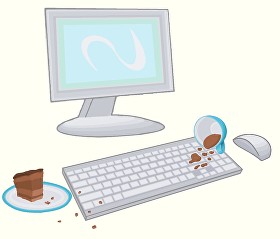
If you don’t want to be like the person in this XKCD comic, you might want to clean your keyboard. Luckily, this is an easy task you can do once a week. Or at least once a year…
Ewwww!!
Wipe it down with a slightly damp microfiber cloth, dry it with a different cloth, and then use a disinfectant wipe or a cloth just damp with rubbing alcohol to finish it out (do not use bleach!). It is probably best to do this when your computer and keyboard are unplugged because keyboards are actually quite delicate inside.
Gross stuff under the keycaps? Maintenance will prevent your computer keyboard from getting to this state.
Also, turn your keyboard or laptop upside down and give it a gentle shake or two about once a week. Gentle being the operative word. You may be surprised to see what falls out of it.
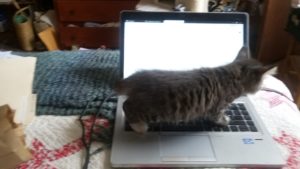
Especially if you have a cat for an intern. Here’s looking at you, Janet Oakley!
Janet’s intern, Kinky Boots, hard at work.
We’ve even seen Argus vacuum his keyboards. But, that is up to you.
Really consider giving this a try. Your keyboard will feel cleaner. All the bits of dust and crumbs of food you’ve learned to ignore will be gone, and it will be such a pleasant experience for your hands.
Clean your screen
We’ve all had that experience of editing and suddenly an errant apostrophe or period appears where there ought not to be one. We click on it to edit it, but something about the way it appears doesn’t quite make sense, and then we can’t delete it from the page. That’s when it clicks. The screen is just dirty.
To clean it, a microfiber cloth is always the recommendation. Always dab any cleaning solution (Windex and/or a little bit of mild soap and water are recommended but check before trying anything else!) onto the cloth, not directly on the screen itself.
Password Management
Over 353 million passwords are hacked in 2023, according to Statista, and this number has continues to grow substantially each year.
The concept of a healthy mind, healthy body can be applied to healthy software, healthy hardware, too. Now that you have a clean machine, make sure you have a good password system. While two-factor authentication (such as when you need to type in a code from your phone or email as well) can seem like a hassle but is also another key factor in security. For reliable password managers, see the following.
We use these here at Chanticleer—but use caution and be prepared!
Using numbers, characters, and upper and lower cases matters when it comes to password security.
Make sure the password you decide on for your managers is something that is memorable to YOU. The only other person who should have it is your estate executor or life partner or someone that you would trust with your bank accounts and credit cards.
If you happen to momentarily forget your master password, because someone was talking to you while you were creating it – you will need to start over. There is no way to recover your account, unless you happen to find the random piece of paper you scribbled your master password on… Experience is a cruel teacher…
IMPORTANT: DO NOT USE THE SAME PASSWORD for your business/work accounts and your personal household accounts or publishing accounts. This is how hackers can take people down by infiltrating a business password—harder to do, but they have access to so many personal accounts because so many people use the same password for home and personal accounts.
After hearing from several authors whose computers were hacked, bank accounts taken over, ransomware remotely installed, and other malicious activity that drained their credit card balances and credit ratings, and stole their intellectual property (as in books – published and unpublished), we suggest you go directly to a password manager. Do not go another day without a password manager!
You can do it! There are several excellent password managers that are FREE or as little as $36 per year.
For more information here are three links to articles about password managers from reliable sources:
Here is a link from CNet on the Best Password Manager companies
[Note from Editor: Do NOT proceed to this step until you have your Password Manager project all sorted out. ]
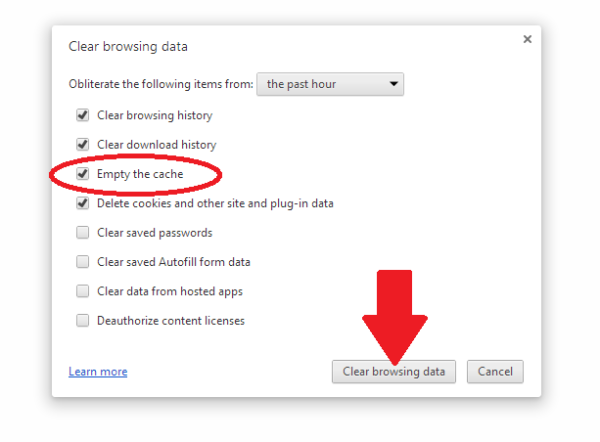
As we barrel forward into the future, there’s so much in our cache that this has become a bigger and bigger project. Luckily, PC Mag has a great article about how to clear your cache on any browser. While this can be a little tricky to navigate, it can be worth it for the faster computer speed. PC Mag also focuses on the security risks of the cache, but chances are most of us don’t have to worry too much about those.
WHY SHOULD YOU CLEAR YOUR CACHE from COOKIES?
This is called “Browser Hygiene.” Really.
Browsers tend to hold onto information and like a clogged drain, after a while, it will slow down the speed and performance of your computer. Where your browser holds onto this information is in its “cache.”
A computer’s cache (pronounced ‘cash’) is also where websites that you visit implement their “cookies”—that bread crumb trail that rambles through the internet linking your computer to the websites you visit. Each and every website uses cookies—even yours is guilty of it. It is the nature of the internet…
Have you ever had this happen to you?
“I don’t see the change. You said you updated on your web page.”
That is because your computer is storing and showing you the previous cache of the website it stored in its cache. You aren’t seeing the latest and greatest of the website you are revisiting, but rather a “shadow” of it.
To see the latest version of a website or webpost, you will probably have to clear your computer’s cache, which will delete cookies at the same time.
Each computer and browser has a different system, so we advise you to search on your browser (i.e. Google it) on how to clear the cache for your particular system.
Also, you can decide how much of the cache you want to clear. All of it? Only the cookies? Save the passwords? Clear the passwords? (the reason to do #2 Password Management first). It is probably a good idea to clean the password cache at least once a year. But remember that you will need to do a fresh login for each website that you visit. See #2 Password Management.
We clear our caches here at Chanticleer at least every three months or as needed to access new data from websites that we visit.
More info:
Remember all that fuss about Data Privacy back in May 2018? Cache and Cookies are what that was and is all about. Here is a handy link to Chanticleer’s blog post about it. Are you ready for the GDPR? (General Data Protection Regulation)
Virus Protection
What are the odds of becoming a victim of a cyber attack? One in Five
Any highly rated anti-virus and anti-malware program will update itself on a daily basis for latest hacking techniques, Trojan horses, phishing methods, ransomware, adware, spyware, and worms (I shudder to think about this one), and other malicious activity. This is different than updating the program itself. Is your antivirus program a couple of years old? If so, time to do some research.
Again, we’re going to turn to the experts here and look at CNET’s best Windows antivirus Protection. A good antivirus keeps your computer running in top shape, and it keeps your data and writing easy to access for yourself, so you don’t end up like one of the characters in Neal Stephenson’sReamde who end up with all their files locked away by ransomware.
Now for some potentially bad news.Ifmalware has made it into your computer, you will need to have it professionally removed or contact the family and friends computer geek to save your computer and your sanity. If you are computer handy, then you have probably already taken steps to rid your computer of it.
The scary thing about malware is that once it has infiltrated your computer, it may be hard to detect even by anti-virus protection. That is how sneaky and underhanded malware can be.
Some symptoms that your computer may be infected with malware:
Your computer is slowing down
Your computer crashes more often or “locks up”
Your friends and contacts receive strange messages from you
Suddenly you do not have any storage space available
Your homepage changed itself without you changing it.
PUPs show up. These are Potentially Unwanted Programs that have infiltrated your system when you give your consent to install additional tools on your computer. We think “barnacles” would be a better name.
Make sure that your computer (and smart phone) has the latest anti-virus and anti-malware programs protecting it.
Now for some definite good news!
Highly rated by independent and professional reviewers of Anti-Virus and Anti-Malware programs are available from free to $59 a year. A small price for piece of mind.
Don’t think that it can’t happen to your computer. Computer viruses and malware are prevalent and widespread. Once they find a home, they tend to go systemic in a very sly and under-the-radar kind of way. Your screen will not flash or start posting pictures of Moriarty when your computer has been invaded. Today’s hacks tend to be silent but deadly.
That’s what we want you to see! That you are safe!
Back up your files
Anything that you’d have trouble replacing, it’s worth backing up. There are several places like One Drive, Dropbox, or Google Drive that will let you store files for free, up to a certain point. Luckily, external hard drives are getting cheaper all the time, and you can always do both. Whenever one of my free online drives fills up, I move anything I’m not currently using onto my external hard drive. I also make sure to periodically back up my writing.
This is such a great fear of mine that on my fire list (list of things that I need to grab immediately in case of fire) I have my external hard drive above everything else. I’m sure if you aren’t someone who has lost data, you know people who have, and I dearly hope you never have to worry about that.
Cyber Threats STOPS with each of US!
Once your computer and files are all protected, you’ll be free to write without any anxiety hanging over your head. Like cleaning and maintaining most things, a routine means you only need to do a little work when the time comes to get everything squared away.
We hope these were handy reminders. Everybody gets busy and can easily procrastinate about taking care of these mundane but vital tasks. We certainly do!
If there is something we should add to this blog post or you have an experience that you would like to share or a question that you would like to ask about the cleaning and maintenance of your writing tools, please contact us at Chanticleer@ChantiReviews.com
We’d love to hear from you!
Thank you for joining us and please stay tuned for the next Business and Marketing Tools and Tips for Writers Article!
Thank you for joining us for this Writer’s Toolbox Article!
Writer’s Toolbox
Thank you for reading this Chanticleer Writer Resolutions article.
Our Annual Chanticleer Authors Conference (CAC25) will be April 3-6, 2025, where our 2024 CIBA winners will be announced. Space is limited and seats are already filling up, so sign up today! CAC25 and the CIBA Ceremonies will be hosted at the Bellingham Yacht Club Event Center located on the shore of beautiful Squalicum Harbor in Bellingham, WA.
Can’t find the time to write during the holidays? Don’t let the season of “Ho! Ho! Ho!” turn into a season of “Slo, Slo, Slo!”
Twinkling lights sparkling on a snowdrift. Cherished Christmas carols playing on the radio. The warm glow of a fireplace, and your loved ones planning holiday celebrations.
It’s a beautiful time of year and even busy authors deserve time to enjoy it!
The holiday season is a time for celebration, connection, and sometimes, a little chaos. For writers, it can also be a period of distraction. Between shopping, party planning, hosting, and travel plans; staying focused on your writing can feel like a major challenge.
It doesn’t have to be. With a little extra dedication and a bit of planning, you can keep pace with your writing goals by tapping into the extra energy and inspiration the holiday season always brings with it.
Whether you’re working on a novel or other writing projects, these tips will help you stay focused and motivated so you can make meaningful progress, even when the holiday hustle is in full swing.
Begin With Realistic Goal Setting
There’s no denying the holiday season is the busiest time of year and putting pressure on yourself with unrealistic expectations can easily lead to burnout. Instead, dial back your writing goals to a more reasonable level by setting achievable targets that fit within your holiday event schedule.
Begin with word count. If you usually write 1,000 words a day, aim for 500 or even just 300 words during the holidays. Just keep writing.
Focus on one topic or scene at a time. Sometimes it’s less overwhelming if the project is broken up into sections, like finishing a single chapter instead of a three chapter scene.
Stay consistent. The goal for the next few weeks is to keep the writing habit alive, even if that means staying awake to greet Santa as he comes down the chimney. Sometimes the only productive time you’ll found is when the house is still asleep.
Don’t over-commit. Your writing and your well-being are as important as your holiday party planning. Pay attention to your schedule as you load it up with holiday events. Writing should feel like a way to unwind, not an added stress.
Glean Festive Inspiration to Fuel Your Creativity
The holidays bring back so many memories and promises of the future. Perfect moments to spark inspiration! That time you took a sleigh ride across a snowy landscape, or maybe the holiday album your grandfather always played during your Thanksgiving dinner—these are all great prompts for a new scene. Let the season enhance your creativity!
Put your five senses to work. Do you remember the smell of the Thanksgiving turkey coming out of the oven? Can you hear the jingle bells on your front door? Try to recall the excitement you felt when you caught your first glimpse the mall Santa? There are thousands of sensory moments you can look to for writing prompts.
Observe family dynamics. You know you have the funniest, weirdest, most annoying family members, right? Gather inspiration for your writing from the real conversations you hear around the holiday table. Play off the emotions of the moment to create dialog that pops with the energy of the season!
Prioritize Short Writing Sessions
Sometimes a time crunch is unavoidable. When your schedule is packed and sitting down for long hours isn’t an option it’s best to prioritize short, focused writing sessions. This is the approach I take:
15 to 20 minute writing blocks.Put all your focus into the writing for a short period of time and see how many words you can get down.
5-minute breaks. Taking 5 minute breaks from writing will keep you feeling like you aren’t falling too far behind in your holiday task, and you may be surprised how many of those little things you can get done in 5 minutes or less!
Plan Writing Breaks to Balance Rest and Productivity
Writing is mentally, and sometimes emotionally, hard work and many writers suffer burnout. You may feel that taking breaks is a luxury this time of year, but it’s essential during such a busy season. Here’s how to balance rest with productivity:
Plan your time off. Set aside specific days off from writing. Prepare by blocking out that day on your calendar and stocking up on whatever it is that helps you relax, whether it’s scheduling a hike or buying canvas for a painting session.
Use breaks wisely. If you are experiencing burnout, the best remedy is to get up and do something completely different. If you just need a day to relax before diving into your project again, do something that can refresh and inspire you, like reading, watching a movie, or going for a bike ride. This will help keep your creativity fresh.
Organize a Mini Writing Retreat
In between your holiday visits with friends and family, gather your writing friends together for a mini writing retreat! This can be done at home, at a nearby café or library, or even online! Here’s how to structure it:
Set clear intentions. Decide what you want to accomplish, whether it’s drafting a chapter or brainstorming ideas.
Gather supplies. Bring notebooks, pens, or any reference materials.
Plan mini-breaks. Schedule intervals for conversation with the other writers over coffee to keep your energy up.
Lean on Accountability with a Writing Partner
The holiday season is ideal for connecting with fellow writers. Reach out to a friend or join an online group for accountability. Here’s why it works:
Shared goals. Each week, set one or two achievable writing targets that will keep each other motivated.
Check-in regularly: Text or a chat during a brief call to discuss each other’s progress and offer support.
Staying focused during the holidays is all about balance. Embrace the joy of the season while carving out space for your writing by setting realistic goals, creating a flexible routine, and finding ways to tap into the unique energy of the holidays. You’ll find you can continue to make progress on your work without feeling overwhelmed, and remember, writing doesn’t always have to be about long, uninterrupted hours; even small, consistent efforts can keep your momentum going.
With a little planning and a mindful approach, you can enjoy the holiday festivities without sacrificing your writing. After all, the holiday season is full of inspiration—so let it fuel your writing and help you finish the year strong!
Chanticleer Editorial Services – when you are ready!
Did you know that Chanticleer offers editorial services?We do and have been doing so since 2011.
Tools of the Editing Trade
Our professional editors are top-notch and are experts in the Chicago Manual of Style. They have and are working for the top publishing houses (TOR, McMillian, Thomas Mercer, Penguin Random House, Simon Schuster, etc.).
If you would like more information, we invite you to email Kiffer or David at KBrown@ChantiReviews.com or DBeaumier@ChantiReviews.com for more information, testimonials, and fees.
We work with a small number of exclusive clients who want to collaborate with our team of top-editors on an on-going basis.Contact us today!
Chanticleer Editorial Services also offers writing craft sessions and masterclasses. Sign up to find out where, when, and how sessions being held.







 We clear our caches here at Chanticleer at least every three months or as needed to access new data from websites that we visit.