Celebrating the Twelve Days of Christmas – One Day at a Time
On the 8th Day of Christmas…
“But Jiminy Crickets, it is the 2nd of January! Is it not too late for the 12 Days of Christmas?” you say.
Not to fear, Chanticleerians! The 12 Days of Christmas begins on December 26th! And it continues to the 6th of January – Three Kings Day. The four weeks leading up to Christmas is known as the Advent.
So if you haven’t finished wrapping presents, sending out those cards, and baking cookies—don’t worry—you still have time! You have FIVE Days!
Happy Holidays to You from the Chanticleer Team!
On the Eighth day of Christmas, my true love sent to me
Eight Maids A-Milking
Seven Swans A-Swimming
Six Geese A-Laying
Five Golden Rings
Four Calling Birds
Three French Hens (Chanticleer’s favorite #justsaying)
Two Turtle Doves
And a Partridge in a Pear Tree
This lyric represents the common worker. We are so grateful to all those who make the wheels of the world turn who can be so easy to forget! An extra special Happy New Year to all workers!
Happy Holidays to You from the Chanticleer Team!
On the Eighth Day of Christmas, Chanticleer brings to me…
Tips to keep your workspace clean!
On the 8th Day of Christmas, we’re diving into a very important tradition — keeping your space clean and your computer fresh as we head into the new year. Whether you’re writing your next masterpiece, editing your latest project, or just catching up on emails, your computer is one of your most valuable tools as a writer.
But how often do we think about maintaining it?
Just like your workspace, your computer—whether a desktop, laptop, or your trusty tablet—deserves a little TLC. After all, it’s where your creativity comes to life and where your stories begin to unfold. So, let’s take a moment this holiday season to give your computer the attention it deserves with a little cleaning and maintenance to keep it running smoothly in 2024.
The Essential Clean-Up: Get Your Computer Ready for 2025
Clean Your Keyboard, Mice, and Screens
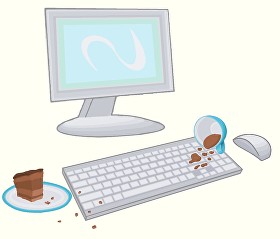
Your keyboard is where the magic happens—but did you know that it can also be a hotspot for dust, crumbs, and all sorts of nastiness? A quick clean-up is a small task with big rewards.
Keyboards: Wipe your keyboard down with a slightly damp microfiber cloth, then dry it with another cloth. Finish with a disinfectant wipe or a cloth dampened with rubbing alcohol to ensure you’re clearing away germs. Don’t forget to give it a gentle shake or tap upside down each week to remove the hidden debris!
Mice & Phones: Just like your keyboard, your mouse and phone need a little love too! Clean them regularly to remove oil and fingerprints, ensuring smooth interaction and a clear screen.
Clear Your Screen for Better Viewing
Editing with a dirty screen is like trying to read through foggy glasses! Let’s avoid that in the new year by cleaning our screens regularly.
Microfiber Cloth: The best way to clean any screen is with a microfiber cloth. Don’t spray cleaner directly on the screen—dab a little onto the cloth and gently wipe the screen in circular motions. You’ll be amazed at how much better everything looks once your screen is spotless!
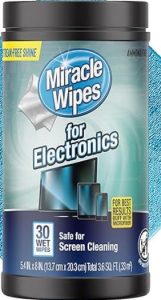
Specialty Wipes: If you’re looking for a quick fix, consider using electronic wipes. These are great for clearing smudges from tablets, smartphones, and laptops—perfect for when you’re writing on the go or working from a coffee shop!
Boost Your Computer’s Performance with Regular Maintenance
It’s not just about the outside. Keeping your computer in tip-top shape means taking care of its inner workings too.
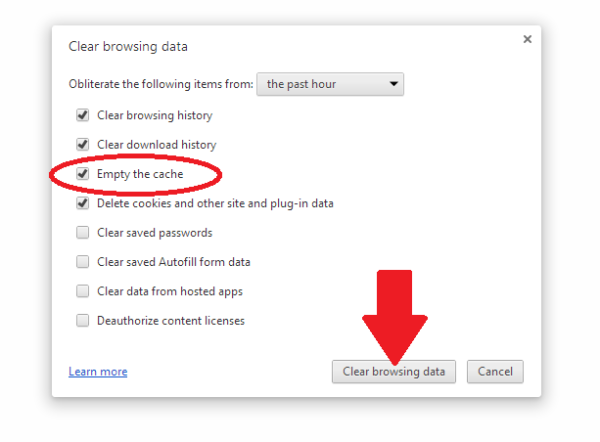
Clear Your Cache: Over time, your computer stores tons of temporary files. While they help speed up certain processes, they can also slow down your machine. Be sure to clear your browser cache and clean up unnecessary files to make your system run smoother.
Update Your Software: Outdated software can lead to performance issues and security vulnerabilities. Start the new year with the latest updates to your operating system, apps, and programs to ensure everything is running as efficiently as possible.
Don’t Forget Your Other Devices!
While you’re in cleaning mode, take a few minutes to clean your phone, tablet, Kindle, and even your remote controls. These everyday devices gather germs and dust, so a quick wipe-down can make them work better and last longer.
A Fresh Start for a New Year of Writing
Stay tuned for the 8th Day of Christmas!
Our favorite part about having the 12 Days of Christmas is that we can have the time we need to celebrate with our loved ones. We have time for wrapping our presents, meeting with friends for hot cocoa, and setting ourselves up in the New Year for publishing success (with Chanticleer Professional Services and the Chanticleer Authors Conference).
Wishing you Happy Holidays from Chanticleer from Kiffer, David, Dena, Scott, Anya, and Argus!
Please enjoy Chanticleer’s Business and Marketing Tips and Tools for Writers for a Happy and Productive 2022!
Start the year out right with our suggestions on the best practices for 2022.
Must-Dos for Authors and Publishers for 2022!
At Chanticleer, as many of you know, we do things a little differently. We are bringing you an author checklist, things for your author development and business.That’s why we’re here!
We suggest tackling one Must-Do a month in any order that you chose except for the first three. Also, we will have a handy checklist to print out at the end of the series for your author lair to help keep you on track.
We wish you a successful and productive year for achieving your publishing goals! ~ The Chanticleer Reviews Team
On the First Blogpost of 2022, Chanticleer gave to me…
Advice on how to care for arguably the most important tool in our toolbox. Care to guess what it is?
We will give you a hint. It stores your intellectual property, aids in getting words from your brain into little alphabet letters that add up to a story. And for most of us, enables us to create what we love most—books and stories!
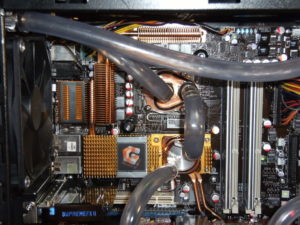
Your hardworking computer – whether it is a desktop, laptop, pad, or your own Mad Maxx creation of technologies (like Argus’s), deserves a little bit of attention.
Computer Care for Authors and Publishers
We often forget how important it is to maintain a clean computer on the inside and outside, even if our desk and the surrounding area is spotless. Here are a few tips to get you started. And, yes, this is your annual reminder!
1. Clean your keyboard
If you don’t want to be like the person in this XKCD comic, you might want to clean your keyboard. Luckily, this is an easy task you can do once a week. Or at least once a year…
Ewwww!!
Wipe it down with a slightly damp microfiber cloth, dry it with a different cloth, and then use a disinfectant wipe or a cloth just damp with rubbing alcohol to finish it out (do not use bleach!). Probably best to do this when your computer and keyboard are unplugged because keyboards are actually quite delicate inside.
Gross stuff under the keycaps. Maintenance will prevent your computer keyboard from getting to this state.
Also, as the character in the cartoon that you clicked on above, turn your keyboard or laptop upside down and give it a gentle shake or two about once a week. Gentle being the operative word. You may be surprised to see what falls out of it.
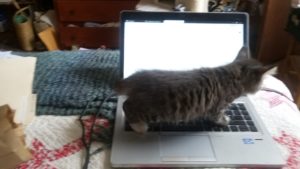
Especially if you have a cat for an intern. Here’s looking at you, Janet Oakley!
Janet’s intern, Kinky Boots, hard at work.
We’ve even seen Argus vacuum his keyboards. But, that is up to you.
Really consider giving this a try. Your keyboard will feel cleaner. All the bits of dust and crumbs of food you’ve learned to ignore will be gone, and it will be such a pleasant experience for your hands.
Clean your screen
We’ve all had that experience of editing and suddenly an errant apostrophe or period appears where there ought not to be one. We click on it to edit it, but something about the way it appears doesn’t quite make sense, and then we can’t delete it from the page. That’s when it clicks. The screen is just dirty.
To clean it, a microfiber cloth is always the recommendation. Always dab any cleaning solution (Windex and/or a little bit of mild soap and water are recommended but check before trying anything else!) onto the cloth not directly on the screen itself.
Password Management
6.85 million passwords are hacked each day or 158 every second. INC magazine 2018 – this number has gone up substantially since 2018.
The concept of a healthy mind healthy body can be applied to healthy software healthy hardware. Now that you have a clean machine, make sure you have a good password system. While two-factor authentication (such as when you need to type in a code from your phone or email as well) can seem like a hassle but is also another key factor in security. For reliable password managers, see the following.
and so do numbers, characters, and upper and lower cases matter it comes to passwords
We use these here at Chanticleer —but use caution and be prepared!
Make sure that the password that you decide on is something that is memorable to YOU. The only other person who should have it is your estate executor or life partner or someone that you would trust with your bank accounts and credit cards.
If you happen to momentarily forget your master password, because someone was talking to you while you were creating it —you will need to start over. There is no way to recover your account, unless you happen to find the random piece of paper you scribbled your master password on… Experience is a cruel teacher…
IMPORTANT: DO NOT USE THE SAME PASSWORD for your business/work accounts and your personal household accounts or publishing accounts. This is how hackers can take people down by infiltrating a business password —harder but to do but then they have access to so many personal accounts because so many people use the same password for home and personal accounts.
But after hearing from several authors whose computers were hacked, bank accounts taken over, ransomware remotely installed, and other malicious activity that drained their credit card balances and credit ratings, and stole their intellectual property (as in books – published and unpublished), do not go another day without a password manager.
There is no excuse. There are several excellent password managers that are FREE or as little as $36 per year.
For more information here are three links to articles about password managers from reliable sources:
Here is a link from CNet on the Best Password Manager to Use for 2021.
[Note from Editor: Do NOT proceed to this step until you have your Password Manager project all sorted out. ]
As we barrel forward into the future there’s so much that this has started to be a bigger and bigger project. Luckily, PC Mag has a great article about how to clear your cache on any browser. While this can be a little tricky to navigate, it can be worth it for the faster computer speed. PC Mag also focuses on the security risks of the cache, but chances are most of us don’t have to worry too much about those.
WHY SHOULD YOU CLEAR YOUR CACHE from COOKIES?
This is called “Browser Hygiene.” Really.
Browsers tend to hold onto information and like a clogged drain, after a while, it will slow down the speed and performance of your computer. Where your browser holds onto this information is in its “cache.”
A computer’s cache (pronounced ‘cash’) is also where websites that you visit implement their “cookies” — that bread crumb trail that rambles through the internet linking your computer to the websites that you visit. Each and every website uses cookies — even yours is guilty of it. It is the nature of the internet…
Have you ever had this happen to you?
“I don’t see the change. You said you updated on your web page.”
That is because your computer is storing and showing you the previous cache of the website it stored in its cache. You are not seeing the latest and greatest of the website that you are revisiting, but a “shadow” of it.
To see the latest version of a website or webpost, you will probably have to clear your computer’s cache which will delete cookies.
Each computer and browser has a different system, so we advise you to search on your browser (i.e. Google it) on how to clear the cache for your particular system.
Also, you can decide how much of the cache that you want to clear. All of it? Only the cookies? Save the passwords? Clear the passwords? (the reason to do #2 Password Management first). It is probably a good idea to clean the password cache at least once a year. But remember that you will need to do a fresh login for each website that you visit. See #2 Password Management.
We clear our caches here at Chanticleer at least every three months or as needed to access new data from websites that we visit.
More info:
Remember all that fuss about Data Privacy back in May 2018? Cache and Cookies are what that was and is all about. Here is a handy link to Chanticleer’s blog post about it. Are you ready for the GDPR? (General Data Protection Regulation)
Virus Protection
What are the odds of becoming a victim of a cyber attack? One in Four
Any highly rated anti-virus and anti-malware program will update itself on a daily basis for latest hacking techniques, Trojan horses, phishing methods, ransomware, adware, spyware, and worms (I shudder to think about this one), and other malicious activity. This is different than updating the program itself. Is your antivirus program a couple of years old? If so, time to do some research.
Again, we’re going to turn to the experts here and look at CNET’s best Windows antivirus Protection. A good antivirus keeps your computer running in top shape, and it keeps your data and writing easy to access for yourself, so you don’t end up like one of the characters in Neal Stephenson’sReamde who end up with all their files locked away by ransomware.
Now for some potentially bad news.Ifmalware has made it into your computer, you will need to have it professionally removed or contact the family and friends computer geek to save your computer and your sanity. If you are computer handy, then you have probably already taken steps to rid your computer of it.
The scary thing about malware is that once it has infiltrated your computer, it may be hard to detect even by anti-virus protection. That is how sneaky and under handed malware can be.
Some symptoms that your computer may be infected with malware:
Your computer is slowing down
Your computer crashes more often or “locks up”
Your friends and contacts receive strange messages from you
Suddenly you do not have any storage space available
Your homepage changed itself without you changing it.
PUPs show up. These are Potentially Unwanted Programs that have infiltrated your system when you give your consent to install additional tools on your computer. We think “barnacles” would be a better name.
Make sure that your computer (and smart phone) has the latest anti-virus and anti-malware programs protecting it.
Now for some definite good news!
Highly rated by independent and professional reviewers of Anti-Virus and Anti-Malware programs are available from free to $59 a year. A small price for piece of mind.
Don’t think that it can’t happen to your computer. Computer viruses and malware are prevalent and widespread. Once they find a home, they tend to go systemic in a very sly and under-the-radar kind of way. Your screen will not flash or start posting pictures of Moriarty when your computer has been invaded. Today’s hacks tend to be silent but deadly.
That’s what we want to see! You are safe!
Back up your files
Anything that you’d have trouble replacing, it’s worth backing up. There are several places like One Drive, Dropbox, or Google Drive that will let you store files for free, up to a certain point. Luckily, external hard drives are getting cheaper all the time, and you can always do both. Whenever one of my free online drives fills up, I move anything I’m not currently using onto my external hard drive. I also make sure to periodically back up my writing.
This is such a great fear of mine that on my fire list (list of things that I need to immediately grab in case of fire) I have my external hard drive above everything else. I’m sure if you aren’t someone who has lost data, you know people who have, and I dearly hope to never have to worry about that.
Cyber Threats STOPS with each of US!
Once your computer and files are all protected, you’ll be free to write without any anxiety over your head. Like cleaning and maintaining most things, a routine means you only need to do a little work when the time comes to get everything squared away.
We hope these were handy reminders. We all get busy and can easily procrastinate about taking care of these mundane but vital tasks. We certainly do!
If there is something we should add to this blog-post or you have an experience that you would like to share or a question that you would like to ask about this blog post, please contact us at Chanticleer@ChantiReviews.com
We’d love to hear from you!
Thank you for joining us and please stay tuned for the next Business and Marketing Tools and Tips for Writers Article!
Thank you for joining us for this Writer Resolutions Article
Our 10th Anniversary Chanticleer Authors Conference (CAC22) will be June 23-26, 2022, where our 2021 CIBA winners will be announced. Space is limited and seats are already filling up, so sign up today! CAC22 and the CIBA Ceremonies will be hosted at the Hotel Bellwether in Beautiful Bellingham, Wash. Sign up and see the latest updates here!
Because of COVID, we are offering flexible registration packages—just in case!
When you’re ready,did you know that Chanticleer offers editorial services?We do and have been doing so since 2011.
Our professional editors are top-notch and are experts in the Chicago Manual of Style. They have and are working for the top publishing houses (TOR, McMillian, Thomas Mercer, Penguin Random House, Simon Schuster, etc.).
If you would like more information, we invite you to email Kiffer or Sharon at KBrown@ChantiReviews.com or SAnderson@ChantiReviews.com for more information, testimonials, and fees.
We work with a small number of exclusive clients who want to collaborate with our team of top-editors on an on-going basis.Contact us today!
Chanticleer Editorial Services also offers writing craft sessions and masterclasses. Sign up to find out where, when, and how sessions being held.
A great way to get started is with our manuscript evaluation service, with more information availablehere.
And we do editorial consultations for $75. Learn morehere.
If you’re confident in your book, consider submitting it for a Editorial Book Reviewhereor to one of our Chanticleer International Awardshere.
Writer’s Toolbox
Thank you for reading this Chanticleer Writer Resolutions article.




 The Essential Clean-Up: Get Your Computer Ready for 2025