One of our favorite Writing Communities meets annually at the Chanticleer Authors Conference!
How to Form a Writing Community
No matter where you are in the writing journey, it’s never too late to join a Writing Community or form a Critique Group. We’ve talked to people who have ran book groups at our own local Village Books, those who ran the Skagit Valley Writers League, and those who have gone through graduate-level writing classes to bring you the best tips and tricks for your community needs.
Writing Communities and Critique Groups are often a wonderful and necessary step on the journey to becoming a professional author, not just someone scribbling into the void.
So my Writing Community will fulfill all of my authorly needs?
Commander Tuvok and Ensign Kim of the USS Voyager. Kim is usually wrong.
Probably not. Just like one person can’t fulfill all our needs for friendship, writing communities are diverse and can include your local bookstore to the writing group you found online during quarantine. It isn’t just one thing, but here we’ll talk about how to build one if you notice your needs aren’t getting met as well as they could be.
First, we’ll focus on where to begin, then we’ll dive into actually running a critique group.
Starting your Group
Pick who you want to be in your Writing Community
When putting together a group it can be important to consider both experience and demographic. If you’re hoping to publish by the end of the year, it’s important to work with like-minded people as opposed to writers who are just discovering their voice. Of course, even a writer who is still working through their craft may be an excellent reader, so don’t be afraid to take a chance on someone!
Likewise, while it’s helpful to have a variety of readers, ask yourself who the audience for your book is. Lee Child’s The Killing Floor has a pretty different audience from The City of Glass by Cassandra Clare. The best feedback will come from the people who would be interested in grabbing your work at the bookstore.
If you’re looking for more on connecting with readers, and less on connecting with other writers, check out this article on reader engagement from Kiffer Brown here.
Decisions in a Critique Group
There are plenty of ways to run a writing group, but knowing if it’s open or closed and whether people come prepared to give feedback or if they’re expected to give feedback in the moment is key
For a critique group though, startby asking if it’s going to be a closed or an open group. Even with an open group, it helps to recruit people to join it initially, so you set the tone and hopefully create something that will really serve your needs.
For an open group, you’ll have the great pleasure of extraordinary writers coming into your sphere, though on the other hand, you will also find writers whose work needs desperate help beyond what you can give to the work just being plain offensive. Despite that, the rewards of working in an open group are innumerable, as are the connections that will help expand your circle of influence.
In a closed group you don’t have the same level of variety in the people you work with, but the consistency can make up for that. Of course, if the people you invite in end up feeling hurt, this can negatively affect friendships that have been brought into the group.
Regardless of who you have in a group, it’s worth remembering that writing is a sensitive art, and it does well to treat people kindly, even when giving direct feedback.
When is Feedback done?
Whether or not you choose to do an open or closed group, you also need to pick whether or not work will be read in advanced so feedback can be ready to present at group. The other natural option is that the author will present their work at the group and receive feedback immediately after.
I ran a group for 7 years that sent work in advance, and I found the extra time to comment and think about a book really helped! That said, the maximum word count suggestions and number of members we had meant we critiqued approximately 40,000 words a month! That’s a lot of novels!
In contrast, Janet Oakley, a Chanticleer Overall Grand Prize Winner, is still in a group where the author reads the work aloud and then receives feedback in the moment. That group saves a lot of time and effort by keeping the focus on just what can be shared in the time that they meet. Both have great merits! – David
Regardless of the choice you make, writers will be able to get a huge benefit from however feedback is delivered!
Community is something we make at Chanticleer
Here at Chanticleer we have our usual (or unusual) suspects in terms of people who live near us and are guaranteed to show up at our local events ready to cheer us on.
To facilitate this, we’ve created The Roost, a private online community for serious authors looking for support. Not only does The Roost offer steep discounts on many Chanticleer services, there are weekly write ins, monthly workshops, author promotion projects, NaNoWriMo support, and of course pictures of our beloved pets (always a must).
If you’re interested in joining the Roost, please reach out to AuthorOutreach@ChantiReviews.com
One of Kiffer’s adorable kitty cats
The Roost is a social community where authors can share their expertise and knowledge with fellow writers who take the craft and business of being an author seriously. Make posts and share photos just like any other social media, but better since the community is intentionally curated for writers!
Thank you for joining us for this Writer Toolbox Article
There is so much to learn and do with Chanticleer!
From our Book Award Program that has Discovered the Best Books since the early 2010s to our Editorial Book Reviews recognizing and promoting indie and traditional authors, Chanticleer knows your books are worth the effort to market professionally!
When you’re ready,did you know that Chanticleer offers editorial services?We do and have been doing so since 2011.
Our professional editors are top-notch and are experts in the Chicago Manual of Style. They have and are working for the top publishing houses (TOR, McMillian, Thomas Mercer, Penguin Random House, Simon Schuster, etc.).
If you would like more information, we invite you to email us at info@ChantiReviews.com for more information, testimonials, and fees.
We work with a small number of exclusive clients who want to collaborate with our team of top-editors on an on-going basis.Contact us today!
Chanticleer Editorial Services also offers writing craft sessions and masterclasses. Sign up to find out where, when, and how sessions being held.
A great way to get started is with our manuscript evaluation service, with more information availablehere.
And we do editorial consultations for $75. Learn morehere.
You’ve finished your first work in progress, and written those fateful words: THE END. Then, like a good writer, you revise it, one, two, seven, eight times! You’ve spent well over a year with the work, and you’re either ready to begin querying or you’ve decided that you don’t want to deal with the gatekeepers in the publishing industry. Whichever describes you, your book is ready to see the world!
The many hats worn by authors
Or is it?
Here are some questions (but certainly not all) to ask yourself before you publish your work:
Have you asked a professional to look your work over?
Have you considered how you’re going to format the interior?
What are you going to do for cover design?
What medium do you want to publish in? Physical, ebook, audio?
What company do you want to use to publish your work?
How will you market your book?
It’s too much!
If that feels overwhelming, there’s a reasonable explanation. Publishing is a business, and a different person is often paid to help answer each of these questions in a traditional publishing environment. Self-Published Authors frequently serve as their own project manager, meaning they are the head editor, publisher, marketer, and designer for their book. Don’t be afraid to set ambitious goals, and also remember to be gentle with yourself as this process takes serious time.
We’re going to make two basic assumptions going forward: 1. You want an ISBN, and 2. You’re doing this because you have the budget to do so.
Now, let’s start with the first bullet point on the list.
Having a Professional Review Your Book
The Overview
One of the biggest issues we come across with books is that there’s no story. The writing is crisp, clean, even gorgeous, but the most that can be said for the novel is it’s well-written. The plot does not compel and the characters do not drive. In the words of Anne Lamott:
“Any plot you impose on your characters will be onomatopoetic: PLOT.”
For those reasons, we recommend having a Manuscript Overview first, whether you receive that from us or from someone else. Professionals who understand the writing industry and work with publishers are uniquely situated to give you feedback on whether or not you have a story that people will want to read and buy.
Kiffer Brown with an overview presentation
A good Manuscript Overview will examine the following:
Compelling nature of story
Dialogue
Character development
Does the scenery and setting work with the story
Backstory issues
Professionalism of editing & formatting
Continuity of storyline
Plotting and plot-hole issues
Writing craft
This stage comes before line and copyediting, as you still have plenty of work to do in bringing the work up to being the best it can be. You can read more about our suggestions surrounding Manuscript Overviews here.
Line Editing, Copy Editing, and Proof Reading
While we have all the general information about this on our Editorial Services page, those thoughts and definitions are worth repeating here. Our Editorial Coordinator can discuss with you about whether or not your work needs more development before moving onto the next stage in editing.
Line Edit
If your story still has developmental issues (dialogue, plotting, character development, etc.), your work would benefit from a Line Edit. Line Editing is a line-by-line edit to make sure that each sentence pushes the story forward and creates just the right amount of pacing and tension. Each and every word should count!
Line Edit Review is a final check that all issues and concerns have been addressed by the author and that new problems have not been created in the reworking of the manuscript.
Copy Edit
WorldKeeper Diane Garland always has excellent suggestions to track your story
We highly suggest that you have a Style Sheet Guide created that is the basis of your story-bible. A Style Sheet Guide will ensure that your characters’ names, place names, conventions (examples are: Happy Christmas instead of Merry Christmas or blond or blonde or using kilometers instead of miles), jargon, pet names, time frame, and more — the attention to detail that will set your work apart from the fray.
After reworking the manuscript and addressing the editor’s suggestions, then the work should be ready for a Copy Edit with an editor with fresh eyes.
Copyediting is a mechanical edit. It focuses on grammar, punctuation, spelling, typos, continuity errors, and timeline errors.
If a Style Sheet has been generated, then the manuscript will be edited using it to ensure consistency.
Proof Read
A proof read with a third set of fresh eyes is the final reading to catch the inevitable typos and glitches.
If a Style Sheet was generated prior to the copy edit, then it will be used in the final proofing of the work.
Proofing comes before formatting. Formatting is determined by the publishing platform.
As we get into the nitty gritty details of proof reading, that’s a good time to examine the often forgotten question of formatting.
Professional Touch
Call in the pros!
Many authors rightly find themselves wrapped up in the joys and beauty of their work. This devotion to writing is what makes them so good at what they do, and it is important to have an outside, less biased perspective to help you along. Often a key part of a story or character exists only in the author’s mind, and somehow it never found its way onto the page. Hiring extra eyes really can make the difference when it comes to your book being excellent as opposed to just another of the millions of published titles a year.
That’s all the time we have for this article. We’ve covered the importance of having professional eyes on your book. In a future article we’ll look at:
Interior Format
Cover Design
Mediums of Publishing
Self-Publishing Companies
Marketing
Stay tuned!
Thank you for joining us for this Writer’s Toolbox Article!
Our 12th Anniversary Chanticleer Authors Conference (CAC24) will be April 18-21, 2024, where our 2023 CIBA winners will be announced. Space is limited and seats are already filling up, so sign up today! CAC24 and the CIBA Ceremonies will be hosted in Beautiful Bellingham, Wash. Sign up and see the latest updates here!
When you’re ready,did you know that Chanticleer offers editorial services?We do and have been doing so since 2011.
Our professional editors are top-notch and are experts in the Chicago Manual of Style. They have and are working for the top publishing houses (TOR, McMillian, Thomas Mercer, Penguin Random House, Simon Schuster, etc.).
If you would like more information, we invite you to email Kiffer or David at KBrown@ChantiReviews.com or DBeaumier@ChantiReviews.com for more information, testimonials, and fees.
We work with a small number of exclusive clients who want to collaborate with our team of top-editors on an on-going basis.Contact us today!
Chanticleer Editorial Services also offers writing craft sessions and masterclasses. Sign up to find out where, when, and how sessions being held.
A great way to get started is with our manuscript evaluation service, with more information availablehere.
And we do editorial consultations for $75. Learn morehere.
If you’re confident in your book, consider submitting it for a Editorial Book Reviewhereor to one of our Chanticleer International Awardshere.
Writer’s Toolbox
Thank you for reading this Chanticleer Writer Resolutions article.
Speaking of our Chanticleer International Book Awards, remember that the 2023 CIBAs will be announced at our 12th Anniversary Conference on April 18-21, 2024! Seating is limited, so register today!
In this article, we’ll look through different types of research, including interviews, ethnographies, and place-based research. You can learn more from Carol M. Cram’s article here on tapping experts for your book.
1. Interview for Research
This is a simple and reliable option to learn more about the subject at hand. For example, one of our favorite Chanticleerians, Janet Oakley (interviewed here), is no stranger to tracking down people to talk to in order to complete her novels. In writing her book, The Jøssing Affair (read the review here) set in occupied Norway during WWII, Oakley interviewed people who lived through the occupation to better understand what they went through.
In giving an interview, you often want to start out with the easier questions, warming your subject up and giving them a chance to relax into the easy rhythm of responding. This gives you a chance to form a connection with a real person that might even last beyond the interview, and it lets you warm up to more difficult questions.
2. Ethnography for Research
Ethnography refers to observing people from the outside to better understand how they work. If you’re writing a police procedural (as one might for the Clue Awards) and want to capture the atmosphere in a police station, you might ask to sit in one for a while and take notes.
In conducting good ethnographic research, you want to record the day of the week, the time, and a basic standard for how you take notes. If it’s quiet, how do you interpret the quiet and why? Is it the end of the day when people are ready to go off shift or has something bad happened that’s set a pall over the precinct? How do those quiets look different to you?
You’ll record the day of the week and the time because places look different at different times. There’s a Friday feel, even at places that work through the weekend, and any obstetrician will tell you the difference between a normal workday and a full moon.
3. Place-Based Research
This is similar to ethnography except you are going and spending time in the location where your work takes place – whether Non-Fiction or Fiction. You can bet that Janet Oakley also went to Norway to better understand what living there would be like and see what changes have taken place since WWII. Plus, it’s always easier to find people to interview in the country that you’re writing about.
Fantasy writers travel to new lands through portals in trees.
The question to ask here is how does the setting become a character for you in a way that will let your reader believe that the place is real. And remember, just because it is real or what you’re describing really happened a certain way, that doesn’t mean the way you’ve described it is believable to the reader. Having the extra experience of actually lived or visited the place that you’re writing about adds that extra touch of veracity.
4. Research Map
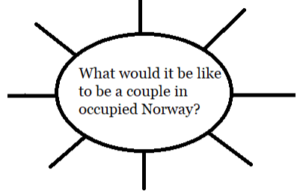
As you embark on your research you can begin your research map. We recommend starting with your central question. Oakley’s question for The Jøssing Affair was “What would it be like to be a couple in occupied Norway?”
From this point she can begins to expand into other interests as she goes through the story. As you start your research map, you might end up finding out that your central question, while great for generating research, might not end up being the focus of the story. Be open, let the ideas take you where they need to go in the story.
5. Find a Second Pair of Eyes
Once you’ve put everything together it’s easy to be so close to your work that you can’t be objective about it in a regular novel, but once you start using research it can fall into many pitfalls. Maybe your historical novel starts to sound too much like a travelogue, or your lab lit begins to like a textbook instead of a thriller. Inviting someone from outside your area of the specialized novel is a great way to find out how your readers will react to your text.
We always recommend a Manuscript Overview that does a deep dive into the general strokes of your book followed by our Editorial Services to move step by step through your book and really make it sing.
No matter where you are in your story, you should be proud of the work you have put in so far! Research is difficult, and we know you’re on your way to great things!
Writer’s Toolbox
Thank you for reading this Chanticleer Writer Toolbox article.
View all awards and upcoming deadlines here. Over 30,000 in Cash and Prizes are given away annually!
When you’re ready,did you know that Chanticleer offers editorial services?We do and have been doing so since 2011.
Our professional editors are top-notch and are experts in the Chicago Manual of Style. They have and are working for the top publishing houses (TOR, McMillian, Thomas Mercer, Penguin Random House, Simon Schuster, etc.).
If you would like more information, we invite you to email Kiffer or Sharon at KBrown@ChantiReviews.com or SAnderson@ChantiReviews.com for more information, testimonials, and fees.
We work with a small number of exclusive clients who want to collaborate with our team of top-editors on an on-going basis.Contact us today!
Chanticleer Editorial Services also offers writing craft sessions and masterclasses. Sign up to find out where, when, and how sessions being held.
A great way to get started is with our manuscript evaluation service, with more information availablehere.
And we do editorial consultations for $75. Learn morehere.
If you’re confident in your book, consider submitting it for a Editorial Book Reviewhereor to one of our Chanticleer International Awardshere.
Please enjoy Chanticleer’s Business and Marketing Tips and Tools for Writers for a Happy and Productive 2022!
Start the year out right with our suggestions on the best practices for 2022.
Must-Dos for Authors and Publishers for 2022!
At Chanticleer, as many of you know, we do things a little differently. We are bringing you an author checklist, things for your author development and business.That’s why we’re here!
We suggest tackling one Must-Do a month in any order that you chose except for the first three. Also, we will have a handy checklist to print out at the end of the series for your author lair to help keep you on track.
We wish you a successful and productive year for achieving your publishing goals! ~ The Chanticleer Reviews Team
On the First Blogpost of 2022, Chanticleer gave to me…
Advice on how to care for arguably the most important tool in our toolbox. Care to guess what it is?
We will give you a hint. It stores your intellectual property, aids in getting words from your brain into little alphabet letters that add up to a story. And for most of us, enables us to create what we love most—books and stories!
Your hardworking computer – whether it is a desktop, laptop, pad, or your own Mad Maxx creation of technologies (like Argus’s), deserves a little bit of attention.
Computer Care for Authors and Publishers
We often forget how important it is to maintain a clean computer on the inside and outside, even if our desk and the surrounding area is spotless. Here are a few tips to get you started. And, yes, this is your annual reminder!
1. Clean your keyboard
If you don’t want to be like the person in this XKCD comic, you might want to clean your keyboard. Luckily, this is an easy task you can do once a week. Or at least once a year…
Ewwww!!
Wipe it down with a slightly damp microfiber cloth, dry it with a different cloth, and then use a disinfectant wipe or a cloth just damp with rubbing alcohol to finish it out (do not use bleach!). Probably best to do this when your computer and keyboard are unplugged because keyboards are actually quite delicate inside.
Gross stuff under the keycaps. Maintenance will prevent your computer keyboard from getting to this state.
Also, as the character in the cartoon that you clicked on above, turn your keyboard or laptop upside down and give it a gentle shake or two about once a week. Gentle being the operative word. You may be surprised to see what falls out of it.
Especially if you have a cat for an intern. Here’s looking at you, Janet Oakley!
Janet’s intern, Kinky Boots, hard at work.
We’ve even seen Argus vacuum his keyboards. But, that is up to you.
Really consider giving this a try. Your keyboard will feel cleaner. All the bits of dust and crumbs of food you’ve learned to ignore will be gone, and it will be such a pleasant experience for your hands.
Clean your screen
We’ve all had that experience of editing and suddenly an errant apostrophe or period appears where there ought not to be one. We click on it to edit it, but something about the way it appears doesn’t quite make sense, and then we can’t delete it from the page. That’s when it clicks. The screen is just dirty.
To clean it, a microfiber cloth is always the recommendation. Always dab any cleaning solution (Windex and/or a little bit of mild soap and water are recommended but check before trying anything else!) onto the cloth not directly on the screen itself.
Password Management
6.85 million passwords are hacked each day or 158 every second. INC magazine 2018 – this number has gone up substantially since 2018.
The concept of a healthy mind healthy body can be applied to healthy software healthy hardware. Now that you have a clean machine, make sure you have a good password system. While two-factor authentication (such as when you need to type in a code from your phone or email as well) can seem like a hassle but is also another key factor in security. For reliable password managers, see the following.
and so do numbers, characters, and upper and lower cases matter it comes to passwords
We use these here at Chanticleer —but use caution and be prepared!
Make sure that the password that you decide on is something that is memorable to YOU. The only other person who should have it is your estate executor or life partner or someone that you would trust with your bank accounts and credit cards.
If you happen to momentarily forget your master password, because someone was talking to you while you were creating it —you will need to start over. There is no way to recover your account, unless you happen to find the random piece of paper you scribbled your master password on… Experience is a cruel teacher…
IMPORTANT: DO NOT USE THE SAME PASSWORD for your business/work accounts and your personal household accounts or publishing accounts. This is how hackers can take people down by infiltrating a business password —harder but to do but then they have access to so many personal accounts because so many people use the same password for home and personal accounts.
But after hearing from several authors whose computers were hacked, bank accounts taken over, ransomware remotely installed, and other malicious activity that drained their credit card balances and credit ratings, and stole their intellectual property (as in books – published and unpublished), do not go another day without a password manager.
There is no excuse. There are several excellent password managers that are FREE or as little as $36 per year.
For more information here are three links to articles about password managers from reliable sources:
Here is a link from CNet on the Best Password Manager to Use for 2021.
[Note from Editor: Do NOT proceed to this step until you have your Password Manager project all sorted out. ]
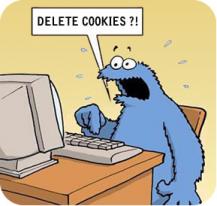
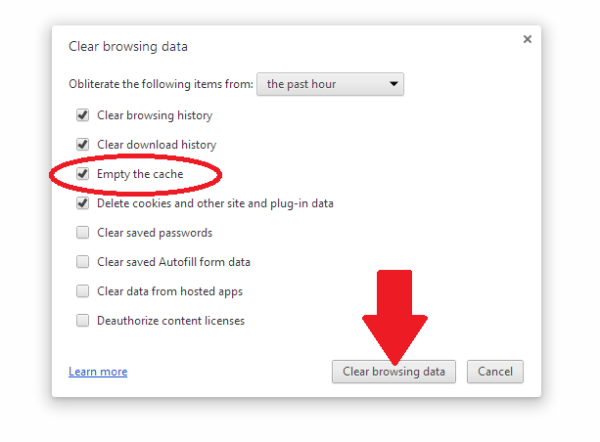
As we barrel forward into the future there’s so much that this has started to be a bigger and bigger project. Luckily, PC Mag has a great article about how to clear your cache on any browser. While this can be a little tricky to navigate, it can be worth it for the faster computer speed. PC Mag also focuses on the security risks of the cache, but chances are most of us don’t have to worry too much about those.
WHY SHOULD YOU CLEAR YOUR CACHE from COOKIES?
This is called “Browser Hygiene.” Really.
Browsers tend to hold onto information and like a clogged drain, after a while, it will slow down the speed and performance of your computer. Where your browser holds onto this information is in its “cache.”
A computer’s cache (pronounced ‘cash’) is also where websites that you visit implement their “cookies” — that bread crumb trail that rambles through the internet linking your computer to the websites that you visit. Each and every website uses cookies — even yours is guilty of it. It is the nature of the internet…
Have you ever had this happen to you?
“I don’t see the change. You said you updated on your web page.”
That is because your computer is storing and showing you the previous cache of the website it stored in its cache. You are not seeing the latest and greatest of the website that you are revisiting, but a “shadow” of it.
To see the latest version of a website or webpost, you will probably have to clear your computer’s cache which will delete cookies.
Each computer and browser has a different system, so we advise you to search on your browser (i.e. Google it) on how to clear the cache for your particular system.
Also, you can decide how much of the cache that you want to clear. All of it? Only the cookies? Save the passwords? Clear the passwords? (the reason to do #2 Password Management first). It is probably a good idea to clean the password cache at least once a year. But remember that you will need to do a fresh login for each website that you visit. See #2 Password Management.
We clear our caches here at Chanticleer at least every three months or as needed to access new data from websites that we visit.
More info:
Remember all that fuss about Data Privacy back in May 2018? Cache and Cookies are what that was and is all about. Here is a handy link to Chanticleer’s blog post about it. Are you ready for the GDPR? (General Data Protection Regulation)
Virus Protection
What are the odds of becoming a victim of a cyber attack? One in Four
Any highly rated anti-virus and anti-malware program will update itself on a daily basis for latest hacking techniques, Trojan horses, phishing methods, ransomware, adware, spyware, and worms (I shudder to think about this one), and other malicious activity. This is different than updating the program itself. Is your antivirus program a couple of years old? If so, time to do some research.
Again, we’re going to turn to the experts here and look at CNET’s best Windows antivirus Protection. A good antivirus keeps your computer running in top shape, and it keeps your data and writing easy to access for yourself, so you don’t end up like one of the characters in Neal Stephenson’sReamde who end up with all their files locked away by ransomware.
Now for some potentially bad news.Ifmalware has made it into your computer, you will need to have it professionally removed or contact the family and friends computer geek to save your computer and your sanity. If you are computer handy, then you have probably already taken steps to rid your computer of it.
The scary thing about malware is that once it has infiltrated your computer, it may be hard to detect even by anti-virus protection. That is how sneaky and under handed malware can be.
Some symptoms that your computer may be infected with malware:
Your computer is slowing down
Your computer crashes more often or “locks up”
Your friends and contacts receive strange messages from you
Suddenly you do not have any storage space available
Your homepage changed itself without you changing it.
PUPs show up. These are Potentially Unwanted Programs that have infiltrated your system when you give your consent to install additional tools on your computer. We think “barnacles” would be a better name.
Make sure that your computer (and smart phone) has the latest anti-virus and anti-malware programs protecting it.
Now for some definite good news!
Highly rated by independent and professional reviewers of Anti-Virus and Anti-Malware programs are available from free to $59 a year. A small price for piece of mind.
Don’t think that it can’t happen to your computer. Computer viruses and malware are prevalent and widespread. Once they find a home, they tend to go systemic in a very sly and under-the-radar kind of way. Your screen will not flash or start posting pictures of Moriarty when your computer has been invaded. Today’s hacks tend to be silent but deadly.
That’s what we want to see! You are safe!
Back up your files
Anything that you’d have trouble replacing, it’s worth backing up. There are several places like One Drive, Dropbox, or Google Drive that will let you store files for free, up to a certain point. Luckily, external hard drives are getting cheaper all the time, and you can always do both. Whenever one of my free online drives fills up, I move anything I’m not currently using onto my external hard drive. I also make sure to periodically back up my writing.
This is such a great fear of mine that on my fire list (list of things that I need to immediately grab in case of fire) I have my external hard drive above everything else. I’m sure if you aren’t someone who has lost data, you know people who have, and I dearly hope to never have to worry about that.
Cyber Threats STOPS with each of US!
Once your computer and files are all protected, you’ll be free to write without any anxiety over your head. Like cleaning and maintaining most things, a routine means you only need to do a little work when the time comes to get everything squared away.
We hope these were handy reminders. We all get busy and can easily procrastinate about taking care of these mundane but vital tasks. We certainly do!
If there is something we should add to this blog-post or you have an experience that you would like to share or a question that you would like to ask about this blog post, please contact us at Chanticleer@ChantiReviews.com
We’d love to hear from you!
Thank you for joining us and please stay tuned for the next Business and Marketing Tools and Tips for Writers Article!
Thank you for joining us for this Writer Resolutions Article
Our 10th Anniversary Chanticleer Authors Conference (CAC22) will be June 23-26, 2022, where our 2021 CIBA winners will be announced. Space is limited and seats are already filling up, so sign up today! CAC22 and the CIBA Ceremonies will be hosted at the Hotel Bellwether in Beautiful Bellingham, Wash. Sign up and see the latest updates here!
Because of COVID, we are offering flexible registration packages—just in case!
When you’re ready,did you know that Chanticleer offers editorial services?We do and have been doing so since 2011.
Our professional editors are top-notch and are experts in the Chicago Manual of Style. They have and are working for the top publishing houses (TOR, McMillian, Thomas Mercer, Penguin Random House, Simon Schuster, etc.).
If you would like more information, we invite you to email Kiffer or Sharon at KBrown@ChantiReviews.com or SAnderson@ChantiReviews.com for more information, testimonials, and fees.
We work with a small number of exclusive clients who want to collaborate with our team of top-editors on an on-going basis.Contact us today!
Chanticleer Editorial Services also offers writing craft sessions and masterclasses. Sign up to find out where, when, and how sessions being held.
A great way to get started is with our manuscript evaluation service, with more information availablehere.
And we do editorial consultations for $75. Learn morehere.
If you’re confident in your book, consider submitting it for a Editorial Book Reviewhereor to one of our Chanticleer International Awardshere.
Writer’s Toolbox
Thank you for reading this Chanticleer Writer Resolutions article.
Social media can feel like a scary thing, but if you work on a schedule and promise yourself a little time on it each week, it’ll grow before you know it.
Go from this>
To This>
YES, YOU CAN!
Social media and marketing can feel like such a pain, but remember, writing is essentially starting your own business, which means you have to manage your product and its image accordingly.
Most writers don’t write to market, but write because we are artists, yet, without doing some marketing, we miss out on big audience interactions.
The main thing here is that it isn’t a mystery, and it isn’t a secret. Social media is a long term place to be, so this will take start up energy, but, like Isaac Newton says, an object in motion stays in motion. Once you’re up and running, social media will be easier to manage, and the results only grow over time. The goal is to be authentic and a human being while keeping to some sort of schedule.
Note from Kiffer: Digital Marketing is all about “long-tail” strategy. Consumers no longer watch shows or read books the day they launch. We are all too busy. But eventually, we do get around to viewing the Netflix series that everyone is talking about or reading that book that intrigued you with its cover that you saw on your social media platform. Social Media posting is a corner stone of any book promotion strategy. Social Media helps to build awareness of your brand and titles.
Rinse and Repeat
Want more marketing tips? Check out this article written by Kiffer Brown and David Beaumier here!
1. Who are you Writing for?
By the point you start marketing your book you should hopefully know who your audience is. Young Adult readers? Mystery lovers? Nature enthusiasts? This will all determine the kind of content you want to be sharing on social media. Elana A. Mugdan does a great job of this focusing her Twitter toward fantasy.
You can’t scroll through five posts without seeing a dragon! She also advertises to the Ace Community who, you guessed it, loves dragons! All that’s missing is cake!
Elana A. Mugdan
The next question to ask yourself is how many copies of this do you want to sell? If you’re looking for a smaller print run, maybe your focus on selling will only come in brief bursts rather than be something you link to regularly, and then once you’re out of books, you let your feed return to normal. But we at Chanticleer imagine you’re in this writing business for multiple books.
Once you figure out who you write for and how many people you hope to reach, that information will help guide what you put in your profile. Like your book cover, readers should be able to tell at a glance if your social media platform will appeal to them or not, so make sure you make it clear who your audience is.
2. Find a Consistent Voice and Theme
It helps if the voice for your social media matches or at least is adjacent to how you write for your novels.
If you are a fantasy writer it makes sense to share information about fantasy topics and images. Maybe you have faerie circle Sundays where you share beautiful photos of mushrooms. Whatever it is, go with it and let your work inform how you post. We’ll look at Avanti Centrae a little more later in this post, but you can see her posts Twitter here is a great example of keeping the focus on global thrillers. This will be important in all the following suggestions. The next thing to keep in mind is…
3. Keep a Social Media Calendar
Like any business, you want to have a schedule of some sort. The current top media organizations (it will change) are Twitter, Facebook, Instagram, and TikTok. Here are some good rules of thumb:
Twitter: post once a day with a focus on text and sometimes media.
Facebook: post twice a week with a balance between text and media.
Instagram: post twice a week with a focus on media. Even if you just want to do text, make it an image somehow.
TikTok: This one deserves to be separated out because it’s so easy to cross post onto other media platforms. It seems like posting twice a day, three times a week is probably a good starter for TikTok. Vary your video lengths, but remember, you want to keep people who approach your social media content focused on the reason that social media exists. TikTok is meant to be entertaining!
Since TikTok is the fastest growing social media platform and a significant number of Indie authorsWe have scheduled several sessions on TikTok for CAC 22.
This level of posting also fits well for the amount of attention the users for these sites give to their respective styles of media. Your posts don’t have to be radically different across platforms, but they should be tailored to the feel of each, Twitter being more of a slice of life, Facebook being a little more thoughtful and engaging, Instagram more focused on visual media, and TikTok focused on video.
Consider doing themed days, such as Selfie Saturday, Superhero Month, whatever will fit in with the voice and theme you believe will appeal to your audience. A theme also takes away some of the work of needing to decide what to post about from square one every day.
And be sure to use hashtags for your themes to expand your audience reach. Click here for our article on #Hashtags. Kiffer
Now, if none of these platforms work for you, there are plenty of others with their own recommendations to be researched. TikTok is the newest and shiniest, while Tumblr can work better for people who are more content driven and discomforted by Facebook and Twitter. We count Patreon as a social media since you can use it to connect with other creators, and it can be a good way to generate some passive income (though making a living on it is a whole other level). Likewise, YouTube can be a wonderful platform if you make videos. You can always “Go Live” on the original platforms mentioned, and we’ll talk about that later in this post.
4. Be a Human Being
Don’t be mistaken for a robot or a “bot”
The main goal of social media is to connect with other people. Don’t be afraid to be yourself. You can post pictures of yourself, your life, your pets (please post pet pictures), and even thoughts that are generally on your mind. Do you have any life questions you’ve been considering? Holiday plans that you want to share in order to hear about the plans other people have?
Going along with the idea of holidays, it’s okay to take social media breaks. Let your followers know when you step away, so they know not to expect a response. That also shows you’re a person and not a bot programmed to send out canned content.
One of our favorite authors who really puts herself into her posts is Janice Ellis, PhD. You can see her Twitter here, and you can see how her own work and passions are entangled throughout her posts. She does a great job sharing more content about her life than selling her work, which is a great way to reach people. No one wants to follow a one person advertising company that only tries to get you to buy their product.
Janice Ellis, Ph.D.
Take a little time, after your posting, the scroll through and be social with people. Scrolling to comment and react to people’s content only needs to last ten minutes at most. A little goes a long way, and with a few comments on posts that interest you, your friends and followers will remember that they’re in your thoughts, and then you’ll be in theirs. If some of their content really speaks to you, share it! And speaking of sharing…
5. Recommend Material
When you find something you love spread the joy! I still gush about Rob Slater’s Deserted Land series five years after reading it because I was so carried away by the way he brought a dystopian YA to life in a city I know and love, which I had never seen before. Whenever one of those “Post only 7 Titles of Books you Love” posts goes around, you can bet I share my favorite Chanticleer authors first and foremost.
Rob Slater
When you share material you like that’s in the genre you write, you’re also re-emphasizing the voice of your social media and letting that author’s audience know that they might like your work, too.
And it goes beyond just books. Products, photos, memes, these are all fun posts that let people see who you are and get to know you a little better. It helps clue people in to the world you are passionate about.
6. Create Shareable Content
This one can be a little tricky of all the suggestions so far because it’s not always clear what will do well. Here are a few examples:
Make a meme. These are images with text superimposed, usually with some relevant pop culture reference
Send out an author Newsletter
Write blogposts, either on your own website, on Medium, or for a friend’s website. Anything to increase your name recognition out on the web.
Create giveaways for your book
Announce a cover reveal for your book
Fundraisers can be great, too, but those typically work best only once you’ve already developed a solid platform. You want people to give you the greatest gift they have to offer: Their attention.
This content will ideally speak to your audience and be an effective way for you to communicate and interact with them. Think creatively about what you can share because chances are, you already have a good candidate. When it comes to shareable content and interviews, check out Avanti Centrae whose Twitter you can find here.
Avanti Centrae
7. #Hashtags
Another difficult concept to grasp is the mystery of hashtags. While we’ve all felt #blessed at some point, the important thing is to use hashtags that will actually stand out to your audience. The trickiest hashtags are the ones that you want to convey a sense of what you’re doing, for example #amwriting has over 2 million Google results while #writeratwork has just over ten thousand. It’s clear which one will find more engagement and will be searched more often.
If you aren’t sure what hashtag to use, look up a few of your favorite authors in your genre and make a list of what they’re using, and then check what’s most popular.
The easy side of hashtags is when you’re attending a specific event with a readymade hashtag. At the Chanticleer Author’s Conference, we use variations on #CAC followed by the year. This was #VCAC21 and next year will be #CAC22 because we are so hopeful that we will be able to have an in-person conference next year! Hashtags should be simple and easy to use. Our 10th Anniversary Chanticleer Authors Conference (CAC22) will happen LIVE at the Hotel Bellwether in beautiful Bellingham, Wash, April 7-10, 2022.
8. Be Live
Interact with people and let them into your life. Consider launching polls for your readers to be able to respond directly to you. These can be related to titles or what should happen next with a character. You are an active writer, and that means people can actively participate with you.
You can also “Go live” and post video of you interacting with readers in real time. Things you can do when you are live:
A Q&A session about your work, writing process, and the research that goes into your writing.
Introduce people to your pets
Read some of your work
Read someone else’s work that you recommend
Promote your books
Run a fundraiser or giveaway
Raise awareness about a subject you are passionate about.
John Green, Author of The Fault in Our Stars and many other books, even goes live when he signs the pages that are to be inserted in his upcoming books. He just chats casually with the camera to help the time pass.
9. Where Chanticleer Fits
When you have a victory, especially related to one of your books, you should crow about it! A Blue Ribbon for a First Place Category or Grand Prize win in one of our 24 contest divisions you can enter here? A positive Editorial Review which you can sign up for here? Digital badges from both of those? All of it can be posted on social media and your website to highlight the progress and recognition your book has earned.
There are millions of books being published, and you can take all of these steps and still get missed. But if you participate in a writing community with international reach and gain recognition with it, that can be one more step to better sales.
Remember, social media takes some up front work, but once it’s set and you’re on a schedule, it’s just another part of the writing career. You can make it work by putting in less than an hour a week once all the pieces are in place. Set your schedule and keep at it!
Writer’s Toolbox
Thank you for reading this Chanticleer Writer’s Toolbox article.
Remember! The Chanticleer Author’s Conference is coming up, April 7-10, 2022! Don’t miss out, register here!
This Chanticleer article is a little more personal than most. Normally we speak generally, but sometimes you can’t replace a good ol’ personal anecdote.
Haruki Murakami:“Writing a long novel is like survival training.”
Barbara Kingsolver: “I have to write hundreds of pages before I get to page one.”
Jodi Picoult: “You might not write well every day, but you can always edit a bad page. You can’t edit a blank page.”
Diane Gabaldon:“Writing is an active skill; the only way to learn is to do it, to actually sit down and write every day.”
With all this in mind, I want to talk here about my experience taking the advice of Rachel Aaron/Rachel Bach from her article “How I Went From 2,000 Words a Day to 10,000 Words a Day.” Whenever I see a new idea for improving writing, I try to play Peter Elbow’s “The Believing Game.” The Believing Game, in short, is an exercise where you ask yourself what would happen if you accepted a particular suggestion as true, and then practice acting as if it were true and seeing what happens as a result.
This man believes!
1. Track where you write.
This was the one I thought was the silliest. During a pandemic, I don’t write anywhere except my bedroom/office, the kitchen, or the living room. However, when I really pay attention to where I write best, I notice a few things.
First, I write well in groups, even if that’s just online at the Roost (Chanticleer’s Online Community) doing writing sprints with friends and the help of Sprinto. Generally, timers help me quite a bit in my writing, because they give me permission to ignore the rest of the world until the timer goes off.
Coffee Klatch Write In is held at the Roost on ZOOM. The next Write-Ins are currently scheduled for Tuesday mornings. However, any Roost member can set up a Write In group to accommodate their time zones—which is handy since Roost members live across North America and around the globe.
Check us out!
We meet up once a week to do some writing. Usually folks join, we chat about what we’re working on for 10-15 minutes, and then dive in to work! Light conversation and the Chat are excellent ways to check in.
Tuesday, Sept. 28, 2021 from 10 a.m. – Noon PST
Tuesday, Oct. 5, 2021 from 10 a.m. – Noon PST
Tuesday, Oct. 12, 2021 from 10 a.m. – Noon PST
I also found out, weirdly enough, that my most productive space is not my desk where I work from home and play videogames, but rather on my futon with plenty of pillows for back support using my laundry basket as a desk.
I don’t know what the magic is, but I really like working on this laundry basket. -DB
I have no idea what it is about these factors. Maybe it’s the giant stuffed pig that’s my quarantine companion, but that’s where I am happiest and most productive. The second-best place is at the dining room table with the roommate’s dog hanging out.
Maya Angelou passed away on May 28, 2014. She preferred writing lying down and leaning on one elbow.
Maya Lou Angelo rented hotel rooms for a few months at a time in her hometown. She would have the management move all of the paintings and decorations out of the room. Also, they were not allowed in to clean or straighten just in case she had thrown away piece of paper with writing on it that might later prove to be useful. Ms. Angelo said that she would head to around 6:30 in the morning and hang out there until about 2:30 then she would head home to edit. The hotel room was creating and writing only. She would average 10-12 pages of written material a day. She would then edit these pages down to three or four pages in the evening at her home.
“Nothing will work unless you do.” Maya Angelou
2. Track when you write.
This next suggestion helps you learn when you are most productive. I have always dreamed of being that person who wakes up at 5am, reads for two hours, writes about what I read for another two hours, and then eats breakfast and jumps into amazing creative work. It would help if I didn’t need at the very least thirty minutes to drag myself out of bed.
NaNoWriMo this year gave me a strong reset to my writing habits. Having the regular goals made me prioritize my work, and being in quarantine removed many of the distractions I usually have. The deep dive even gave me some great community locally and on The Roost that I’m still holding onto.
Things that I ask myself when tracking:
What Project am I working on?
When did I start?
When did I finish?
What was my general mood?
How many pages/words did I get through?
Where did I write?
Additional notes
Doing NaNoWriMo this last November, I’ve finally discovered that while I can sit down and do paid work at almost any time, I do my best creative writing between 8-11pm. This is tricky, because that’s when most people want to hang out, but I can usually make late afternoon work well, too. The times that don’t work for me?Anytime before 11am. I can always do brainstorm work, but if I want to do writing I’m happy with and make progress in a story, I need to set aside some time in the evening.
This isn’t so much how much time you make to write (though that can help). It’s also about how much writing you do in a particular amount of time. Generally, I write 250 words every 15 minutes. I also write about 250 words every 30 minutes. Depending on how I time myself, I come out with a different amount. Likewise, if Aaron/Bach (from the opening paragraph) sits down to write for only an hour, she writes about 500 words. However, if she sits down to write for 5 hours, she can manage 1500 words in that same hour! The amount of time we know we can get lost in the work affects us each differently.
Looking for more advice regarding what to do with your NaNoWriMo? See this article Chanticleer posted in November here.
3. What do you write on?
Rather than the material (desk, floor, laundry basket), this means more to the tools you use to write. Referring back to Aaron/Bach, I write different places for different things. When I first started at Chanticleer (and I still do), took and kept notes in a journal about how things work here. There are a lot of moving parts and “under the hood” technology here at Chanticleer. I’ve noticed that Kiffer carries around a small black notebook and old school small planning calender even though we use Google Calendar apps and the latest digital management apps (hat tip to Argus Brown) here at the home office of Chanticleer.
Using my journal is also handy for our weekly brainstorming meetings. I find that I can generate 7 “ideas” in ten minutes if I am utilizing my trusty journal instead of my laptop. Now, very little of a full article or project would come out this exercise. It’s just brainstorming and laying out my ideas some place where I can keep track of them until I can work on the details. But it works! I’ve noticed that I have much more trouble brainstorming on a computer where the cursor blinks at me with menace and mocking intent.
The mocking cursor and time flying by.
The other thing that drives me up the wall when trying to brainstorm on a computer is there are so many distractions. If I have an idea, I can focus in, but if I’m casting around for thoughts, I’m open to the world, and the internet adores it when I’m open to suggestion. Somehow social media rarely helps me generate ideas for any type of writing.
Now, of course, once I’m running with an idea, I love the speed that I can put words down and edit when I type rather than scribble. Plus, my writing is always legible on a computer.
4. Mood
You know how it is, you’re in a bad mood, you need to do your writing, you sit down to do the work, and you get maybe half what you usually do done. What if that’s a pattern that you can predict? For me, knowing that when I sit down and I’m grumpy that my roommates haven’t wiped down the counters after cooking spaghetti (my first thought always being there has been a murder in my house), or maybe someone has said something mean on social media (somehow social media always features as an obstacle to writing).
5. Where will the story go next?
EL Doctorow famously said, “Writing is like driving at night in the fog. You can only see as far as your headlights, but you can make the whole trip that way.”
While you probably have written down the broad strokes of what happens at the beginning, middle, and end of your story, it’s important to keep other ideas in mind.
I felt good seeing Aaron/Bach suggest this, as it’s been a longtime habit of mine to sketch out what I want to happen next after I bring a writing session to a close. Since I write late, often this is the point where I feel like I really need to sleep, I’ll do a brief summary of how I see the rest of the text going, and if any strong images come to mind, I’ll write those down as well, hoping to use them as the story goes on.
When I return and see those notes, I simply delete them as I write the scene it suggests, keeping my notes clean and easy to read for what comes next. With the images I can even copy and paste them directly into the work as the place I think they’ll fit best appears on the page.
6. What are you excited about in the story?
I just started editing the first draft of a novel I finished in October. One of the big critiques my writing group gives me is that the conflict doesn’t start soon enough, which I thought was ridiculous!
In the first chapter, my YA protagonist has the 3-person panel for his high school senior project possessed by a conduit of 100 dead souls who he has promised to guide from Limbo into Heaven! What could be more intense than that?!
However, in rereading the work with fresh eyes I notice that my characters eat. A lot.
Now, this is probably from my great love of all breakfast foods and missing going out to restaurants, but everyone in this book can’t get to any scenes because they’re too busy giving light exposition at The Old Spaghetti Factory. As I go through, I find myself skipping these scenes to get to the next on, which tells me that, yes, they are not exciting. If as the writer I don’t care about a scene, it needs to go. If there’s key information I feel like is in that scene, I write it down separately and keep an eye out for the right place to insert it, rather than dragging the reader through yet another pointless meal—even if I am craving a Dutch baby with powdered sugar, cinnamon, maple syrup, and fresh fruit. Maybe with a side of breakfast sausage. Mmm. And hmmm.
Dutch Baby with fruit and powdered sugar on it
7. Review your information
So, for me, what I’ve learned is that I write best in areas where I can be comfortable and don’t have easy access to videogames. I like having friends, either virtual, stuffed, or furry, because then I feel like I’m accountable to someone, even if they only want to listen to me brainstorm when I’m giving them pets.
I am officially an evening person. I love mornings for relaxing, watching the bay, drinking coffee, and making extravagant breakfasts. If you haven’t made yourself Spanish tortilla, it’s easier than you’d expect—give it a try.
A few times a week I need to set aside my evenings for creativity, and that means no Mandalorian with the roommates (sorry Baby Yoda) or virtual game night with friends. If they want to hang out, they can come co-work (write) with me.
I do my starting work in a journal of some sort, and then I do the writing work on a computer. Editing and marketing work also happen on computers, mostly out of necessity and the predominance of the internet.
I am gentle with myself when in a bad mood. Rather than lamenting that I couldn’t do as much as the day before or the week before, I remind myself that creativity is a process, and that even though I was in a bad mood I put in the time today, and that habit counts for more than any single day worth of word count.
I write best when I can work from notes that show me what scene I’m most drawn to write about next in my story. That lets me stay focused on excitement as I go through the work.
Finally, now that you can figure all this out for yourself, protect the things that let you write. They’re the loveliest tools you can give yourself.
8. Set goals
Nailed it
Ask yourself what your stretch goals are, and what goals are you confident you can meet. Go back to your goals periodically. Do they need to be adjusted for where you are in your w-i-p (work in progress). Editing requires a different focus than plotting. Plotting requires a different mind set than creating your characters or atmosphere.
What are your methods and writing habits?
We’d love to hear from you! What spurs you on? What trips you up?
Examine your own life to best see how you can maximize your own productivity and be the author you want to be!
Maybe this is getting something to the point where you can use one of our many Chanticleer services, from the Manuscript Overview, to the Editorial Book Review, to testing the mettle of your work in the Chanticleer Awards. Whatever goals you set, make sure that you keep your gaze on meeting them as you write!
Speaking of the Chanticleer Awards, did you know that we’ll be announcing the Finalists, First Place Winners, and Grand Prize Winners at our Tenth Anniversary Chanticleer Authors Conference (CAC22)? The CIBA Ceremonies will run in tandem with them from April 7-10, 2022! We’re optimistic we will be able to see you in person at the beautiful Hotel Bellwether here in Bellingham, WA.
Writer’s Toolbox
Thank you for reading this Chanticleer Writer’s Toolbox article.
When we sit down to write a story the project can seem overwhelming. The steady on and off of the cursor can be terrifying.
Maybe the blank space will go away if we don’t blink!
But it’s alright. Consider the following steps to help make your writing as easy as a stroll through the barnyard.
Priming the Pump for Your Next Work in Progress?
The pump may be a bit creaky when you start, but keep pumping. It will get easier.
1. Write down the broad strokes of your story.
Consider how you want your story to be structured.
Will it read with a traditional
Introduction
Inciting Incident
Rising Action, Climax
Falling Action
Resolution
Or will it follow something more unique from what’s typical (though the traditional structure obviously still works for many stories). Interested in more of what we’ve said about structure in the past? Check out our interview here with Peter Greene, a 2017 Goethe Award Winner.
Peter Greene, author of the Goethe Grand Prize award-winning “Paladin’s War: The Adventures of Jonathan Moore
From there, write out how you generally see important parts of the story. This might mean you write the story out of order as you highlight any important scenes you want to work out in the beginning, middle, and end of your story. Think of these are your guideposts, leading you through your writing as you like them together, and giving you an excuse to always be excited when you sit down to write because you already have an idea of how the scene will work!
Many authors who do this find that they might end up going a different direction as they try to link up with these guideposts. While it might seem like that just means the writing was good practice, don’t delete the scenes you aren’t using! Save those scenes in a separate file. This can be great inspiration for one off short stories, or they might even fit in better in a future novel project. if by the time you reach that point in your story you realize it doesn’t fit. You can always edit it to fit, or at the very least feel good that you got some good practice in.
2. Brainstorm your characters a bit.
When starting out, many writers find character sheets helpful. The brilliant Jessica Morrell has written about character development and NaNoWriMo here, if you’re interested in reading beyond this. Some suggestions to consider regarding your character:
What are their basic physical characteristics?
How do they respond in stressful situations?
What’s one thing they can’t live without?
Who are the touchstone people in their life?
What do they keep in their refrigerator?
All these questions can lead to fun and surprising answers, but one of the most helpful activities can be writing a therapy session your main characters.
If you don’t know what therapy looks like and you’re a writer…well, you might want to consider therapy.
Joking aside, in a “therapy conversation” the characters must justify why they exist and what they plan to do in the book. How will they respond to the problems their facing? What is their response when the therapist asks them what brings them to therapy today? Now, if the character doesn’t actually get the advice they might receive in this scene (remember, it’s an exercise, not really something that needs to happen in your work), what choices will they make? Writing this out can help the author feel much closer to the characters as real people.
Remember, characters can feel much more real if you, the author, love them. Keep that in mind when you write your terrible villain—someone in your world probably loves them deeply. What makes other characters love your villain and what do you love about them?
3. Worldbuilding
Like character and structure, you’ll want a good handle on your worldbuilding. This can be an excellent time to view your own assumption about how the world works and play those through in a story. Or you can commit to a worldview that fascinates you. One great example of this is Robert Jordan’s Wheel of Time series.
Jordan, who also authored the Conan The Barbarian series, was educated as a nuclear physicist. When his characters step into an alternate dimension (think evil Narnia), time flows differently, which means objects in the characters’ peripheral vision appear closer as the characters move. This little detail blew me away in terms of giving the world a creepy feeling of the forces of evil closing in on the beloved hero, whereas it made my brother who was getting his PhD in particle physics jump up and down in excitement as he explained the why of the description.
The answer was that, following the theory of relativity, when you move extremely fast, the world compresses toward you–really!
Furthermore, Jordan uses a Platonic worldview to govern his magic system. Plato believed that every person and object has an essential and transcendental quality, a whatness that was key to their existence. Whether this is true or not, Jordan’s magic users followed this rule strictly as their magic came from any part of their identity that could be deemed essential—and it was true in Jordan’s world, regardless of the implications in our world.
Some of the most amazing worldbuilding happens in Lab Lit, where authors need to have excellent expertise of the subject they’re writing about, while at the same time understand where they’re going to move into their own interpretation of the world. We all have a way in which we imagine our reality, and it’s important to know that we’re putting that worldview into our own work.
If lab lit describes what you do, consider submitting to ourCygnus Awards or our Global Thriller Awards, both of which offer categories in hard science fiction and lab lit that will let your researched work shine.
All of these will lead, not only to a more cohesive early draft, but to a first draft that finishes sooner. Planning things out means that you always have something to look forward to because you already wrote down all the parts of your book that you felt excited to write.
Remember, your book will be alive and in motion right up until it goes to print (and if there’s a reprint it can always come to life again). Just because you start with a specific good idea doesn’t mean you’re married to it and need to follow it for forever.
For more great advice on World Building, check out Diane Garland’s (Top Story Bible/World Builder Editor) take on it here.
4. The Draft is Done, Now What?
Once you feel like you have a cohesive work, the next step is to find eyes to look over your work. Professional books always have multiple sets of eyes. Ask yourself where you need to go with the draft from here. If you know that there’s going to be a lot of changes, and you’ll be able to catch a good chunk of them, consider a Manuscript Overview here, which will give you a strong sense of what works and what needs to be improved in your story. If you’re at a wall in terms of what can be added, you should check out our Editorial Services here, which will give you a much closer analysis of your work and help you see, on a line level, how you can polish your work to a fine shine.
Working on your own is great, but there’s only so far anyone can go before they need that crucial second set of eyes on their work before it goes off to be edited.
Chanticleer Editorial Services – when you are ready
Did you know that Chanticleer offers editorial services?We do and have been doing so since 2011.
Tools of the Editing Trade
Our professional editors are top-notch and are experts in the Chicago Manual of Style. They have and are working for the top publishing houses (TOR, McMillian, Thomas Mercer, Penguin Random House, Simon Schuster, etc.).
If you would like more information, we invite you to email Kiffer or Sharon at KBrown@ChantiReviews.com or SAnderson@ChantiReviews.com for more information, testimonials, and fees.
We work with a small number of exclusive clients who want to collaborate with our team of top-editors on an on-going basis.Contact us today!
Chanticleer Editorial Services also offers writing craft sessions and masterclasses. Sign up to find out where, when, and how sessions being held.
You can bet that whether you return to the office next fall, or stay as work from home (WFH), or do a mixture of both as we do here at Chanticleer, Zoom meetings will continue to be a part of normal life.
Authors and publishers will particularly need to Zoom or video conference to stay in contact with their readers and as a major component of their book promotion strategy and author branding.
Zooming and video conferencing is a terrific way of reaching out to book clubs, reader fans, book launches, and author events.
Are You Trying to Access a Zoom Webinar or Zoom Meeting and What Are the Differences?
First, determine if you what you are trying to access is a Zoom Webinar or a Zoom Meeting as they are different in how to access them. Webinars tend to be more secure and are also used for Zoom events that are expecting more than 50 attendees.
Zoom Meetings
If it is a Zoom Meeting, all you will need to is the link from the host of the meeting and, and in some cases, perhaps a password that the host will also share with you via an emailed invitation to the specific meeting.
Zoom meetings are perfect for hosting more interactive sessions or if the audience needs to be in broken out into smaller groups. All attendees can see who the other attendees are along with the host and are able to interact with them via the CHAT feature on Zoom.
All attendees can mute and unmute their audio at will.
All attendees can share screens with other attendees.
You do not have to have a Zoom account to attend at Zoom meeting.
Meetings are for collaboration and discussion along with visiting others. We use Zoom meetings for our Roost Happy Hours.
Zoom Webinars
You do have to have an account to attend and accept a ZOOM webinar invitation.
Zoom webinars require users to have an account with an email address and password with ZOOM.us
Use this address when registering for Zoom webinars.
Why use Zoom webinars instead of Zoom Meetings?
Webinars can allow for panelists – not just host and co-host.
Webinars can be accessed by 100 to 10,000 attendees depending on the host’s Zoom license.
Only the Host and Panelist can see who is attending.
Webinars are more secure than meetings.
Only the Host can unmute or mute attendees and appoint panelists.
Only the Host or Panelists may share screens.
Webinars may allow attendees to interact via Chat, Q & A, and answering polling questions.
Zoom webinars tend to be used for lectures, conferences, and larger audiences. Think of the zoom webinar more or less like an auditorium. Meetings are more like sitting around a conference table or participating in a classroom.
Zoom webinars are available through Zoom as a paid add-on by the host.
How can I tell if I have registered with ZOOM.us? — VISIT www.ZOOM.usand try to login. If you cannot, you need to set up a ZOOM account.
It bears repeating…
Why is this important: You will need to have an email address that you use to login to ZOOM.us for webinars. You do not need a Zoom account for meetings.
Frequently Asked Questions:
Do I have to pay to use ZOOM? No. Only hosts have to pay for webinars applications. Zoom is free to users—meetings or webinars. Although, you may have to pay to register for the event that is being Zoomed to receive the password, login, and invitation.
Can I stop and take a break once I log-in?Yes, all you have to do is click the login in again to the daily email invite from ZOOM to access the particularwebinar again.
Do I have to register for individual sessions or just show up? No, like attending a real conference, you may pop in and out at your convenience.
How do I log back in? It is easy. All you have to do is click on that day’s link that you will receive in your event’s email invitation.
Will I be able to ask questions of the presenters? Yes, there is a way to ask questions and to chat with other attendees during the sessions.
How do I ask a Question? Hover your pointer (aka mouse pointer) over the bottom of the ZOOM screen, you will see a menu popup that has Q & A, CHAT, Video, Polls, Video, Mic, etc. Click on Q & A. You will see the Q & A form pop-up. Type your question here.
What is the difference between CHAT and Q & A? The Q & A will be monitored by the session moderator. The CHAT feature is not monitored by the monitor or presenter. This is akin to passing notes in class or texting with your fellow attendees. GO ahead and chat! It is fun to do! And this time you won’t get in trouble. Chatting is like passing notes in class with no worry of getting caught.
And, we know you all will want to attend the2021 Chanticleer Authors Conference #CAC21 virtually on Zoom. VCAC 21 will be held as a Zoom webinar and not a Zoom meeting.
You also might be interested in joining Chanticleer’s exclusive Roost club where authors mingle, mix, and share their expertise and knowledge. It is comfortable and convenient place to take a dip into the Zoom pool.
Leading me to the next item: Zoom etiquette and handy tips.
The Roost at Chanticleer Happy Hour Spring 2020
1. Set up Your Space
If your computer can manage it, virtual backgrounds are always acceptable. You can figure out how to set those up here. See a favorite background of David’s below. There are thousands to choose from. It is up to you select or create the background for your particular purpose. It will be a different one for “visiting with friends and family” than for work or presenting to a book club group or for taking a virtual Zumba or Yoga class. Varying your backgrounds (even using real places) for Zoom meetings will help set the stage for the purpose of the Zoom meeting.
David B.’s fav screen background for Zoom. It is out of this world!
However, some people, like myself, don’t have a computer that lends itself well to virtual backgrounds. I have good news! Most people don’t have professional in home offices, and that’s understandable, so no one will be upset if your bed is floating somewhere behind you. Generally, keeping the space behind you neat and, if you can, free of doors where people who you live with might make a guest appearance. If you have objects that relate directly to your work—books, advertising swag (Chanticleer Blue Ribbons perhaps), etcetera—you can always have that displayed prominently (nothing wrong with a little subliminal advertising). Kiffer advises dressing to promote your brand when promoting your work or participating in publishing/writer events.
Lighting
For lighting, it helps to have one overhead source of light, and then another, brighter light source, set at a forty-five-degree angle to where you’ll be sitting. This helps light you in a way that prevents you from being washed out since you’re lit from multiple angles, and while one side is a little more shadowy, you’re clearly not disappearing into the dark.
And try to keep all of your lighting the same. Most light bulbs come in a blue tint, white tint, or soft white (tungsten, which has an orange tint). Pure white light is the best.
Make sure that you are not backlit (sitting in front of window on a sunny day) or with a lot of lighting behind you. If you are backlit, your video image will disappear. You will appear as a silhouette or a shape.
And some people use professional lighting just for videoing to make themselves look their best. A popular device is a “light ring” that is setup behind the video camera that you are using (whether it is like mine and is situated in my laptop or a separate camera that is connected to your computer.
The main thing is to reduce the amount of light behind you and increase the light shining on you. Just think about how talk shows are always brightly lit even if the air in the evening. Light on you makes wrinkles and aging shadows disappear and generally is more flattering to almost everyone.
State of the Art Brownie Camera!
Lighting should be in front of you and behind the camera. Just like using an old Brownie camera.
2. What to Wear
There’s a certain casual ease to working from home, which is wonderful, but it’s worth keeping a couple of things in mind. For example, when we stand up, we tend to naturally bend over a little bit first. Normally this isn’t a huge problem, but when I’m wearing my billowy pirate shirts for “Talk Like a Pirate Day” everyone’s treated to a look at my navel, which isn’t quite the nautical theme I’m going for. [David B]
You may want to consider to wear solid colors or lightly patterned tops. Take your cue from news announcers and talk show hosts to look your professional best.
For authors, if you are Zooming with a book club or an author event, be sure to promote your author brand with what you are wearing. Treat the video call just like if you were having the event in person.
Also when standing up, whatever you’re wearingon your legs might be visible. Dark sweat pants tend to look more or less like slacks, so there’s still no huge pressure to be wearing jeans.
While it’s great to know how to set up the background and how to possibly dress, one thing that I cannot overemphasize is that you never owe someone a visual look into your home. Zoom fatigue is real, and sometimes we just need to know we aren’t presenting to be on camera twenty minutes after rolling out of bed. If you can manage it, people do like to be able to see who they are speaking to, but if you can’t I truly believe Miss Manners would suggest a simple “I’m sorry, but I’m just not presentable now” should sate any questions about last minute Zoom meetings.
How to Appear at Your Best
Easy photogenic things to do to help you look your best while Zooming
If you are using a laptop with the camera centered at the top of the monitor screen, Kiffer suggests setting it on a stack of books to that the camera is more level with your eyes or perhaps slightly higher so you tilt your head back a bit instead of down. Doing this will help in reducing the look of double chins and undereye shadowing. Plus, it will help you hold your head high! If you need to reach the keyboard, just use an independent keyboard that is within reach along with a mouse.
JellyComb make wireless, foldable, lightweight keyboards starting at $29 topping out at $59. They even have one that you can use with your smart phone! ($49). And while you are checking them out, look at their mice products. Kiffer found out about this company when she trashed her laptop’s keyboard with one too many coffee splashes and cookie crumbs. Her computer was working just fine and so was the monitor. JellyComb’s combo package of mouse and keyboard for $29 had her laptop back up and working pronto! Now she uses the equipment with her new laptop for video calls.
2. Be careful about “Talking Head Syndrome” — Position your camera and/or laptop far enough away from you so that at least your head AND shoulders appear in the video. If the camera is too close you will look like a huge floating head bobbing around to the persons on the receiving side of the videocall.
3. Zoom has a feature called “Touch Up My Appearance” —it really does! It smooths out the complexion. You can find this feature in Settings. Toggle this option back and forth to see the difference.
Your life will become a lot easier if you master a few Zoom hotkeys. You can read directly about all of them here, but I’m going to cover my favorites in this section. Now, these can feel a little frustrating, because you will need to make sure your Zoom window is selected before using any of them. This means you’ve clicked somewhere on the Zoom window before using the hotkey.
The first one worth noting is just Alt, which shows you the possible buttons you can click without needing to mouse over your screen. This means that as you try to use the other hotkeys you’ll be able to visually confirm they’re working by whether or not a red slash has appeared across the associated icon.
Alt+Alets you mute immediately. What Alt+Ameans is that you hit the Alt and A keys simultaneously. The next numbered section will talk about muting and unmuting, butusing Alt+Ais a great way to quickly turn of your sound when you see the dog running to the front door ready to bark and deafen everyone in the meeting.
Fido serenading the other Zoom attendees
Is your roommate just heading out of the shower walking absentmindedly into your video screen? Alt+Vwill quickly shut off your video. It’s also handy if you want to eat while the meeting is happening and don’t want people treated to a show of watching you chew.
Poky Internet? Turning your video off can also be a great way to help improve the quality of your internet.
What will the other attendees see if I turn off my video camera?
Your name that you used to register with ZOOM. That is it.
You without your video camera on during a Zoom meeting. Replace Author with your registered Zoom user name.
I don’t use any of the other hotkeys in meetings except for these three. Alt, Alt+A, and Alt + V. There are several others that you can learn more about on the ZOOM.us website if you are interested.
4. Mute Yourself
You can always start off by saying hi, but for the most part get comfortable muting and unmuting yourself. If you’re not talking, the best course of action is to stay muted. I have a habit of talking to myself a little or humming to myself when in Zoom meetings, maybe occasionally needing to burp a little bit. Having myself muted allows me to keep most of these things hidden rather than embarrassing myself by any unknown sounds.
I also find that leaving myself on mute helps me be more thoughtful when I choose to unmute myself rather than when I can speak at anytime. It is considered to be excellent Zoom etiquette to mute yourself except when you are addressing the rest of the group.
The reason for mute and unmute on Zoom is that only one user at a time will be broadcasted over the audio. For example, if you do not mute and you leave to refill your coffee cup and your cat or dog begins talking (meowing or barking) they will have “the floor” of the Zoom meeting. If a phone rings during a pause it will be picked up.
And David and I can’t begin to tell you how many times that we have inadvertently heard private conversations during breaks when people place calls or chat with roommates and had no idea that everyone on the ZOOM meeting could hear the conversation—whether we wanted to or not.
Mute and Unmute is your Zoom friend!
5. Use the Chat
Now you’re muted, and someone is making a excellent point that you can absolutely relate and add to! Interrupting in Zoom can be tricky, which is where the chat option comes into play. Now, it’s good to know that the host can often save the chat and even see private messages, so make sure that no matter who you type it’s something that won’t embarrass you or hurt anyone’s feelings if the whole group sees it.
Chat can be a great way to show you agree with someone “+1 to Kiffer’s comment!” or to share a resource that you think might help with part of someone’s question.
If you do want to add to the discussion, raise your hand or if it is a happy hour or casual situation, wait your turn and then unmute. Just like you would do in an in person meeting. Don’t interrupt, but do add to the conversation. And just like at cocktail party, or luncheon, don’t be the one who dominates the conversation.
6. Consider the Ethernet
To improve your internet connection consider using an ethernet cable for a direct connection to the internet, and you can try turning off your video if you still have connectivity issues. Remember that Ethernet cable—the blue one?
The cable that was used before wifi internet…long ago and far away…
As said before, you can also always turn off your video if you’re having connection issues.
7. Look into the CAMERA
Looking into the camera will give your viewers the appearance that you are making eye contact with them. It is hard to do at first and will take a conscience effort, but it will make a big difference in how you are perceived in Zoom meetings by appearing attentive and interactive especially if it is a small Zoom meeting.
8. Sipping is okay. Generally speaking, eating is not.
For most Zoom meetings, unless it is an actual virtual dinner going on or a virtual party or some other event where eating is a focus of the meeting, eating while the video camera is a definite no-no. If you have to eat during a Zoom meeting that is not centered around food, then please turn off your video camera while you eat. Perhaps you can get away with popping a piece of cheese or chocolate into your mouth…
If it is an event where eating is part of the meeting, please make sure that your video camera is even further away from you—perhaps videoing you from the waist up. And definitely mute while you are chewing and slurping!
As with most meetings in person, drinking coffee, tea, water, or any kind of beverage is okay. We definitely encourage drinking the beverage of your choice at the Roost Zoom Happy Hours.
And now for something fun!
Which Zoom LEGO Figure Are You?
Thanks to Diane Garland for the meme!
For a look at what not to do or how to get invited to less meetings if that is your plan–LOL. Consider watching the following video from Saturday Night Live. 5 minutes 48 seconds. It’s a classic! And I think it is hilarious how Henriette and Nan got out of future Zoom meetings. Smart!
Starting from here, you’ll have most of what you need for your basic Zoom use. Check out our upcoming Chanticleer Writer’s toolbox article on advanced video conferencing techniques for authors and publishers here.
Please enjoy Chanticleer’s 12 Must-Dos for a Happy and Productive 2021!
Well…maybe not “enjoy” as there ere is a lot of work to be done to complete this list that will help you have a successful and productive 2021 year for your writing career.
Twelve Must-Dos for Authors and Publishers for 2021!
At Chanticleer, as many of you know (especially if you have attended a Chanticleer Authors Conference or VCAC), we do things a little differently. Adapting the theme of “12 Days,” we are bringing you an author checklist, things for your author development and business.That’s why we’re here!
We suggest tackling one Must-Do a month in any order that you chose except for the first three. Also, we will have a handy checklist to print out at the end of the series for your author lair to help keep you on track.
We wish you a successful and productive year for achieving your publishing goals! ~ The Chanticleer Reviews Team
On the First Blogpost of 2021, Chanticleer gave to me…
Advice on how to care for arguably the most important tool in our toolbox. Care to guess what it is?
We will give you a hint. It stores your intellectual property, aids in getting words from your brain into little alphabet letters that add up to a story. And for most of us, enables us to create what we love most—books and stories!
Your hardworking computer—whether it is a desktop, laptop, pad, or your own Mad Maxx creation of technologies, deserves a little bit of attention.
Computer Care for Authors and Publishers
We often forget how important it is to maintain a clean computer on the inside and outside, even if our desk and the surrounding area is spotless. Here are a few tips to get you started. And, yes, this is your annual reminder!
1. Clean your keyboard
If you don’t want to be like the person in this XKCD comic, you might want to clean your keyboard. Luckily, this is an easy task you can do once a week. Or at least once a year…
Wipe it down with a slightly damp microfiber cloth, dry it with a different cloth, and then use a disinfectant wipe or a cloth just damp with rubbing alcohol to finish it out (do not use bleach!). Probably best to do this when your computer and keyboard are unplugged because keyboards are actually quite delicate inside.
Gross stuff under the keycaps. Maintenance will prevent your computer keyboard from getting to this state.
Also, as the character in the cartoon that you clicked on above, turn your keyboard or laptop upside down and give it a gentle shake or two about once a week. Gentle being the operative word. You may be surprised to see what falls out of it.
Especially if you have a cat for an intern. Here’s looking at you, Janet Oakley!
Janet’s intern, Kinky Boots, hard at work.
We’ve even seen Argus vacuum his keyboards. But, that is up to you.
Really consider giving this a try. Your keyboard will feel cleaner. All the bits of dust and crumbs of food you’ve learned to ignore will be gone, and it will be such a pleasant experience for your hands.
Clean your screen
We’ve all had that experience of editing and suddenly an errant apostrophe or period appears where there ought not to be one. We click on it to edit it, but something about the way it appears doesn’t quite make sense, and then we can’t delete it from the page. That’s when it clicks. The screen is just dirty.
To clean it, a microfiber cloth is always the recommendation. Always dab any cleaning solution (Windex and/or a little bit of mild soap and water are recommended but check before trying anything else!) onto the cloth not directly on the screen itself.
Password Management
6.85 million passwords are hacked each day or 158 every second. INC magazine 2018 — this number has gone up substantially since 2018.
The concept of a healthy mind healthy body can be applied to healthy software healthy hardware. Now that you have a clean machine, make sure you have a good password system. While two-factor authentication (such as when you need to type in a code from your phone or email as well) can seem like a hassle but is also another key factor in security. For reliable password managers, see the following.
and so do numbers, characters, and upper and lower cases matter it comes to passwords
We here at Chanticleer use Keypass – but beware!
Make sure that the password that you decide on is something that is memorable to YOU. The only other person who should have it is your estate executor or life partner or someone that you would trust with your bank accounts and credit cards.
If you happen to momentarily forget your master password, because someone was talking to you while you were creating it – you will need to start over. There is no way to recover your account, unless you happen to find the random piece of paper you scribbled your master password on… Experience is a cruel teacher… #justsaying
IMPORTANT: DO NOT USE THE SAME PASSWORD for your business/work accounts and your personal household accounts or publishing accounts. This is how hackers can take people down by infiltrating a business password –harder but to do but then they have access to so many personal accounts because so many people use the same password for home and personal accounts.
But after hearing from several authors whose computers were hacked, bank accounts taken over, ransomware remotely installed, and other malicious activity that drained their credit card balances and credit ratings, and stole their intellectual property (as in books – published and unpublished), do not go another day without a password manager.
There is no excuse. There are several excellent password managers that are FREE or as little as $36 per year.
For more information here are three links to articles about password managers from reliable sources:
Here is a link from C|Net on the Best Password Manager to Use for 2021.
[Not from Editor: Do NOT proceed to this step until you have your Password Manager project all sorted out. ]
As we barrel forward into the future there’s so much that this has started to be a bigger and bigger project. Luckily, PC Mag has a great article about how to clear your cache on any browser. While this can be a little tricky to navigate, it can be worth it for the faster computer speed. PC Mag also focuses on the security risks of the cache, but chances are most of us don’t have to worry too much about those.
WHY SHOULD YOU CLEAR YOUR CACHE from COOKIES?
This is called “Browser Hygiene.” Really.
Browsers tend to hold onto information and like a clogged drain, after a while, it will slow down the speed and performance of your computer. Where your browser holds onto this information is in its “cache.”
A computer’s cache (pronounced ‘cash’) is also where websites that you visit implement their “cookies” —that bread crumb trail that rambles through the internet linking your computer to the websites that you visit. Each and every website uses cookies —even yours is guilty of it. It is the nature of the internet…
Have you ever had this happen to you?
“I don’t see the change. You said you updated on your web page.”
That is because your computer is storing and showing you the previous cache of the website it stored in its cache. You are not seeing the latest and greatest of the website that you are re-visiting, but a “shadow” of it.
To see the latest version of a website or web-post, you will probably have to clear your computer’s cache which will delete cookies.
Each computer and browser has a different system, so we advise you to search on your browser (i.e. google it) on how to do clear the cache for your particular system.
Also, you can decide how much of the cache that you want to clear. All of it? Only the cookies? Save the passwords? Clear the passwords? (the reason to do #2 Password Management first). It is probably a good idea to clean the password cache at least once a year. But remember that you will need to do a fresh login for each website that you visit. See #2 Password Management.
We clear our caches here at Chanticleer at least every three months or as needed to access new data from websites that we visit.
More info
Remember all that fuss about Data Privacy back in May 2018? Cache and Cookies are what that was and is all about. Here is a handy link to Chanticleer’s blog post about it. Are you ready for the GDPR?
Virus Protection
What are the odds of becoming a victim of a cyber attack? One in Four
Any highly rated anti-virus and anti-malware program will update itself on a daily basis for latest hacking techniques, Trojan horses, phishing methods, ransomware, adware, spyware, and worms (I shudder to think about this one), and other malicious activity. This is different than updating the program itself. Is your antivirus program a couple of years old? If so, time to do some research.
Again, we’re going to turn to the experts here and look at CNET’s best Windows antivirus Protection. A good antivirus keeps your computer running in top shape, and it keeps your data and writing easy to access for yourself, so you don’t end up like one of the characters in Neal Stephenson’s Reamde who end up with all their files locked away by ransomware.
Now for some potentially bad news.Ifmalware has made it into your computer, you will need to have it professionally removed or contact the family and friends computer geek to save your computer and your sanity. If you are computer handy, then you have probably already taken steps to rid your computer of it.
The scary thing about malware is that once it has infiltrated your computer, it may be hard to detect even by anti-virus protection. That is how sneaky and under handed malware can be.
Some symptoms that your computer may be infected with malware:
Your computer is slowing down
Your computer crashes more often or “locks up”
Your friends and contacts receive strange messages from you
Suddenly you do not have any storage space available
Your homepage changed itself without you changing it.
PUPs show up. These are Potentially Unwanted Programs that have infiltrated your system when you give your consent to install additional tools on your computer. We think “barnacles” would be a better name.
Make sure that your computer (and smart phone) has the latest anti-virus and anti-malware programs protecting it.
Now for some definite good news!
Highly rated by independent and professional reviewers of Anti-Virus and Anti-Malware programs are available from free to $59 a year. A small price for piece of mind.
Don’t think that it can’t happen to your computer. Computer viruses and malware are prevalent and widespread. Once they find a home, they tend to go systemic in a very sly and under-the-radar kind of way. Your screen will not flash or start posting pictures of Moriarty when your computer has been invaded. Today’s hacks tend to be silent but deadly.
That’s what we want to see! You are safe!
Back up your files
Anything that you’d have trouble replacing it’s worth backing up. There are several places like One Drive, Dropbox, or Google Drive that will let you store files for free, up to a certain point. Luckily, external hard drives are getting cheaper all the time, and you can always do both. Whenever one of my free online drives fills up, I move anything I’m not currently using onto my external hard drive. I also make sure to periodically back up my writing.
This is such a great fear of mine that on my fire list (list of things that I need to immediately grab in case of fire) I have my external hard drive above everything else. I’m sure if you aren’t someone who has lost data, you know people who have, and I dearly hope to never have to worry about that.
Cyber Threats STOPS with each of US!
Once your computer and files are all protected, you’ll be free to write without any anxiety over your head. Like cleaning and maintaining most things, a routine means you only need to do a little work when the time comes to get everything squared away.
We hope these were handy reminders. We all get busy and can easily procrastinate about taking care of these mundane but vital tasks. We certainly do!
If there is something we should add to this blog-post or you have an experience that you would like to share or a question that you would like to ask about this blog post, please contact us at Chanticleer@ChantiReviews.com
We’d love to hear from you!
Thank you for joining us and please stay tuned for the next article on Marketing and Promotion.