
Author: Rochelle Parry

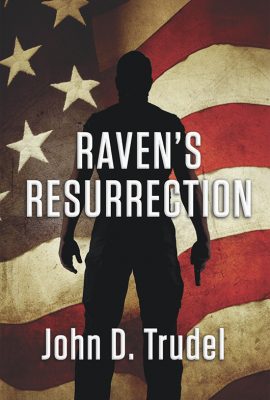
  • RAVEN’S RESURRECTION by John Trudel – Cybertech, Paranormal, Thriller

    RAVEN’S RESURRECTION by John Trudel – Cybertech, Paranormal, Thriller

    “Men sleep peacefully in their beds at night because rough men stand ready to do violence on their behalf.” – George Orwell

    The much-anticipated sequel to Raven’s Redemption is finally here! The story is set just a few weeks after we left Josie and Raven saving the President of the United States from certain death and thwarting the attempts on their own lives using some rather creative methods. The President is a true believer in Josie’s “remote viewing” talents and has her designated a national treasure, worth saving at all costs. Josie’s information can be trusted but never proven. Raven’s job is to do whatever it takes to keep her alive.

    Josie’s paranormal talent makes her a target, and the safe house she and Raven occupy is compromised. Their would-be attackers leave behind clues that open links to a possible Quds base in California, and to a character from Soft Target and Privacy Wars whose mysterious kidnapping over a decade ago will challenge the team to redefine the events that took place at that time.

    The story is set a couple of presidencies in the future and progresses by a series of conversations that require close attention to get the most from this novel. Characters discuss past events and perspectives as examples of ideologies, methods, and motivations dating back to the earlier administrations.

    Raven’s Resurrection plunges the reader into strategic meetings for covert operations. While involving high levels of government, the team operates in the shadows: no cell phones, no recordings, not even written notes for the most part. They do, however, utilize technology created by Cybertech, because of its advanced security features. Targeted individuals need to be taken out without the threads of blame leading back to anyone on the team—especially not to the President.

    Our hero is working less “rogue” now and more as a team member. Raven also realizes that he is stronger when he and Josie work together. Their relationship is maturing, and while the more intimate moments between them are off screen, readers will witness the couple’s deep tenderness toward one another, and thrill as the more strategic aspects of their lives together develop as they work on the logistics of just how best to protect one another.

    Meanwhile, attempts on the President’s life are continuing. Raven’s supporters are pushing the Joint Chiefs to abide a secret committee with the curious name of “Covfefe.” This group operates off the books, deep black, to remove – not arrest – targeted individuals on the premise their elimination would weaken the enemy faster than an all-out war, with the added benefit of fewer casualties.

    Meanwhile, Josie has valuable INTEL regarding an individual with whom the Russians have an interest in, in exchange for something the Americans want; a meeting ensues, but can the Russians be trusted?

    Staging scenes that would be fitting for James Bond, Trudel shines in skill and talent as he gives us wildly entertaining action sequences. Smoke bombs, zappers, lethal weaponry abound! The team has irrefutably graduated from an under-funded, often fumbling, renegade cluster to a sophisticated outfit with souped-up cars, choice weapons, and a decent backup at their disposal.

    This book departs from the familiar third-person narrative. The “I” voice changes from scene to scene, bringing the reader into a “point-of-view” that is as fun to imagine as it is hard, shifting readers from hero to villain. Of course, the first-person point-of-view also invites the opportunity for the unreliable narrator, which adds another layer of intrigue to this story.

    Trudel provides a list of acronyms and their meanings at the beginning of the book. At the end of the book, readers will find his familiar “Factoids and Fantasies” that provide his framework of events and references (from his perspective) on which much of his work centers around. If you’ve enjoyed any of the Cybertech series, you won’t want to miss this latest installment.

     

  • Usability; Part 5 of 5 Things Every Author’s Website Needs

    Usability; Part 5 of 5 Things Every Author’s Website Needs

    The Fifth Post on the Five Pillars of Effective Website Design will Focus on Usability by Readers

    Formatting:
    Break your textual information into bite-sized chunks. Keeping your content in short paragraphs works best for the web – up to four sentences. Longer blocks of text are more likely to be glossed over.

    It is better that your text doesn’t run all the way across the page. Eye tracking studies conclude that it’s easy to lose which line you were reading when jumping to the next line, if the width is more than 500 pixels (a normal sized smartphone is 480 pixels wide horizontally). Ideally, a column width for reading only contains between 45 and 65 characters. Adding small graphics with your content will make the page even more palatable – and if presented to the side, will shorten that column width.

    Just make sure your images are sourced correctly; it’s a violation of copyright to just grab an image off another site and reuse it without permission. Shutterstock and Dreamstime are inexpensive resources for royalty free images. AllTheFreeStock.com has free images you can use commercially.

    Text size:
    Text should be at least 12 pixels. Smaller text will be difficult for your older audience to read, plus Google will consider your site not mobile friendly if the mobile version’s text is not 12 pixels or better.

    Infographics:
    Consider creating a pie graph or other kind of chart to communicate complex data. Especially if you have a large table with a lot of text, translating that data into colors and bars with appropriate labels gets the message across quickly. Here is an article on creating effective information graphics.

    Colors and Contrast:
    Using white text against a colored or black background can emphasize headings, but should be avoided for the rest of the site. Dark grey text on a white background is pleasing to the eye, but the reverse can be more difficult to read. Also consider that some readers have colorblindness. You can see how your site looks to a colorblind person at vischeck.com.

    Of course there are always exceptions; you should research your audience and see what other successful authors in similar genres are doing.

    Navigability:
    Just like you have a proofreader read your work, you need to have someone else look at your website. You’re probably too close to it to see any mistakes or issues. Can your audience find what they’re looking for? How about a screen reader that blind people use? Click here for more details on usability.

    Your links should look different from the rest of your text. The color can be different and/or they can be underlined, or underlined when the user hovers their mouse over the link. The main navigation should be obvious and toward the top of your site. Drop-down menus can allow more links in that area.

    Mobile Friendly:
    More and more users are browsing websites on their mobile devices, and if your site isn’t mobile friendly, you could be losing half your audience. Plus, Google will not rank your site as highly. How do you get a site to look good on a full sized cinema screen AND a tiny cell phone? The answer is responsive design. The backend code will allow your content to either change or flow with various screen sizes. If using WordPress, it helps to choose a theme that is responsive to begin with. If your site is not responsive and you don’t want to redo it, it’s possible to add some code and make it responsive, although it’s best to hire a professional than try it yourself. There are also companies that will create a mobile version of your site for a monthly fee.[fusion_builder_container hundred_percent=”yes” overflow=”visible” margin_top=”40px” margin_bottom=”10px” background_color=”rgba(255,255,255,0)”][fusion_builder_row][fusion_builder_column type=”1_1″ background_position=”left top” background_color=”” border_size=”” border_color=”” border_style=”solid” spacing=”yes” background_image=”” background_repeat=”no-repeat” padding=”” margin_top=”0px” margin_bottom=”0px” class=”” id=”” animation_type=”” animation_speed=”0.3″ animation_direction=”left” hide_on_mobile=”no” center_content=”no” min_height=”none”][fusion_separator style_type=”single|dotted” sep_color=”#e0f5ff” icon=”fa-bookmark” width=”” class=”” id=””/].

    We hope that this series has shed some light on areas where your website can be improved to help you interact with Readers and Media Professionals. The best part is most of these improvements are free if you know how to do it yourself. If not, Chanticleer Reviews offers website assistance and creation as part of their book marketing services targeted specifically for authors.

    Rochelle Parry, Chanticleer Reviews’ Creative Director You are welcome to email me at: RParry@ChantiReviews.com

    Rochelle Parry, webmaster[/fusion_builder_column][/fusion_builder_row][/fusion_builder_container]

  • Web Site Visitor Interaction; Part 4 of 5 Things Every Author’s Website Needs

    Web Site Visitor Interaction; Part 4 of 5 Things Every Author’s Website Needs

    The Fourth Post on the Five Pillars of Effective Website Design will Focus on Visitor Interaction

    [fusion_builder_container hundred_percent=”yes” overflow=”visible”][fusion_builder_row][fusion_builder_column type=”1_1″ background_position=”left top” background_color=”” border_size=”” border_color=”” border_style=”solid” spacing=”yes” background_image=”” background_repeat=”no-repeat” padding=”” margin_top=”0px” margin_bottom=”0px” class=”” id=”” animation_type=”” animation_speed=”0.3″ animation_direction=”left” hide_on_mobile=”no” center_content=”no” min_height=”none”]

    Mail Chimp
    Mail Chimp, free email management

    Building a mailing/contact list is a great way to stay in front of your audience. Using Mailchimp, which is free up to a limited number of subscribers, visitors can sign up to receive news from you. Aweber is another option, but it has a monthly fee.

    Every author needs to have a contact list! How to get people to sign up? Offering something for free – in digital format – is a way to entice people to subscribe to your updates. You can also run a contest to give away a book to one lucky winner during a specific time frame.

    When you own your own website, developing a contact list is much easier to achieve than if you have a blog hosted on WordPress.com, for an example, without owning your own domain name. There is a huge difference between using a WordPress platform for your web site and having your web site hosted within WordPress.com.

    The Importance of Your Own Domain Name

    You might have a Facebook and Twitter account, but do you ‘own’ those websites? Of course not! All you own is your account with them, and Facebook is always discovering different ways to advertise to you and your FB friends utilizing your content in  anyway possible. Plus, their policies for advertising and audience building can change at any time.

    Owning your own domain name allows you to use an email with a matching address, which makes you appear more ‘together’ – your domain name is part of your branding. No one cares if you Yahoo!, Hotmail, Gmail, or AOL: these are all fine for paying bills and ordering online. I personally believe everyone should have a Gmail account to access all of Google’s tools – Google also owns YouTube. If someone sees an email from yourname@yourdomainname.com, they’ll be more likely to open it than one from an anonymous name@everybodysemailer.com.

    If you choose to host your site at GoDaddy, they will charge you for a domain-based email. Setting up a domain-based email through Gmail to avoid these fees while hosting on GoDaddy is only asking for technical trouble. WordPress emailing systems interact in very particular ways with the server on which they are hosted. For web site hosts that do not charge you for email service, click here.

    Social Media

    Another way to interact is to get followers on Facebook, Twitter, Goodreads, etc. By inserting a script, you can allow visitors to ‘like’ you on Facebook directly from your web page. If you are linking to your other accounts, make sure the pages open in a new window.

    Comments

    Allowing your readers to leave comments on your pages or blog entries is the default setting for WordPress page and posts. You can turn this off by toggling “screen options”, check the box for “discussion”, then you’ll have the option of unchecking “discussion”. Why would you want to do that? Well remember the last article about backlinks? A lot of unscrupulous spammers use technology to add their links to your page via comments. The way to stop this is to sign up for a free account at Akismet. Akismet comes with every WordPress installation, but it’s not activated until you get your account.

    Under ‘general settings’, you can also tell your site to not publish any comments until you approve them. If you do this, be sure to check your site often to keep the momentum going. With the correct settings, allowing discussions via comments can be a very fun way to engage your readers.

    Our next post will focus on usability.

    We hope that this article has shed some light on areas where your website can be improved to help you interact with your audience. The best part is most of these improvements are free if you know how to do it yourself. If not, Chanticleer Reviews offers website assistance and creation as part of their book marketing services targeted specifically for authors.

    Read Part Five, the Final Installment, here!

    Rochelle Parry, Chanticleer Reviews’ Creative Director You are welcome to email me at: RParry@ChantiReviews.com

    Rochelle Parry, webmaster[/fusion_builder_column][/fusion_builder_row][/fusion_builder_container]