The LITTLE PEEPS Book Awards recognize emerging new talent and outstanding works in the genre of Early Readers that invites children to read and explore. The Little Peeps Book Awards is a division of the Chanticleer International Book Awards (CIBAs).
Chanticleer International Book Awards Reviews is looking for the best books featuring stories of all shapes and sizes written to an audience for Early Readers. Story books, Beginning Chapter Books, Picture Books, Activity Books & Educational Books we will put them to the test to discovery today’s best children’s books. (For Young Adult Fiction see our Dante Rossetti Awards, for Middle Grade Readers see our Gertrude Warner Awards.)
These titles have moved forward in the judging rounds from SLUSH pile to the 2020 Little Peeps Book Awards LONG LIST and now have progressed to the 2020 SHORTLIST.
These titles have been Shortlisted for the 2020 Little Peeps Book Awards for Early Readers
Ellie Smith –Tex the Explorer Journey Through the Alphabet
M. Lisa Rinaca –P Mind Your Q’s
M. Lisa Rinaca –The Missing Punctuation Box
M. Lisa Rinaca –Two Different Princesses
Courtney Shannon Strand –Hollyhock Hill
Masoud Malekyari –Great As A Button
Susan Faw –Poppy Ogopogo
Carmela Dutra – Little Katie and the STEAM Team
D.K. Brantley –Every Mummy Has a Mommy
Carmela Dutra –Little Katie Goes to the Moon
Dr. Justine Green –Completely Me
Courtney Shannon Strand –Ella’s Umbrella
Lindy Ryan –Trick or Treat, Alistair Gray
Dawn Marie Thompson –Sedwick the Seagull
Mercy Hansen Mize –Samson’s Tail
Pamela Tomlin –Our Wounded Little Chickadee
Johnny Ray Moore – ANTHILL FOR SALE
Alycyn Culbertson –Look What Happened While I Was Sleeping
Raven Howell –So You Want a Puppy?
Pj McIlvaine –Little Lena and The Big Table
Dianne Moritz –Hey Little Beachcomber
Savannah Hendricks –The Book Who Lost Its Title
Teal Blake –J is for Jackalope
Melodie Tegay – Hannah’s Two Homes: life in a “blended” family; a 5 year old’s perspective
These titles are in the running for the Semi-Finalists of the 2020 Little Peeps Book Awards for Early Readers.
Which of these works will move forward in the judging rounds for the 2020 Little Peeps Book Awards for Early Readers?
Good luck to all as your works move on to the next rounds of judging.
The ShortListers’ works will compete for the Semi-Finalists positions. Finalists will be selected from the Semi-Finalists, and then all Finalists will be recognized at the VCAC21 ceremonies. The First Place Category Winners, along with the CIBA Division Grand Prize winners, will be selected from the 22 CIBA divisions Finalists. We will announce the 1st Place Category Winners and Grand Prize Division Winners at the CIBAs Ceremonies April 21-25th, 2021 live at the luxurious Hotel Bellwether in Bellingham, Wash.
We are now accepting submissions into the 2021 Little Peep Awards Book Awards. The deadline for submissions is September 30th, 2021. The winners will be announced in April 2022.
The Dante Rossetti Book Awards recognize emerging new talent and outstanding works in Young Adult Fiction. The Dante Rossetti Book Awards is a genre division of the Chanticleer International Book Awards (#CIBAs).
Named in honor of the British poet & painter Dante Gabriel Rossetti who founded the Pre-Ralphaelite Brotherhood in 1848.
Chanticleer International Book Awards is looking for the best books featuring stories of all shapes and sizes written to an audience between the ages of about twelve to eighteen (imaginary or real). Science Fiction, Fantasy, Dystopian, Mystery, Paranormal, Historical, Romance, Literary, we will put them to the test to discover the best. (For Middle Grade Fiction see our Gertrude Warner Awards, and for Children’s Literature see our Little Peeps Awards.)
These titles are in the running for the Semi-Finalists of the 2020 Dante Rossetti Book Awards for Young Adult Fiction.
Michelle Rene –The Canyon Cathedral: The Witches of Tanglewood,Book Two
John Middleton –Dillion and The Skeleton Hall
Strider S. R. Klusman –Within Reach
Zoe Hauser –Jaguar Spirit
Sue C Dugan –Suppressed
Richard Groseclose –Henry Castlewaite and The Portrait of Doom
Michael Bialys –The Chronicles of the Virago
B. L. Smith –The Fall of the Axe
Liana Gardner –Speak No Evil
D.C. Carlisle –Surviving Eros: The Girl Under the Stars
Brooke Skipstone –Some Laneys Died
Brooke Skipstone –Someone To Kiss My Scars
Sara Hosey –Iphigenia Murphy
Susanne Dunlap –The Paris Affair
Strider Klusman –My Ransom
Susan Wingate –How the Deer Moon Hungers
Felicia Farber –Ice Queen
PJ Devlin –The Chamber — A Wissahickon Monsters Story
Dallas Woodburn –The Best Week That Never Happened
Kelly Vincent –Finding Frances
Chynna Laird –Just Shut Up and Drive
L.L. Eadie –Yearning for the Unattainable
Jodi Lea Stewart –Blackberry Road
Denis Olasehinde Akinmolasire –The Mission to End Slavery
Tory Gates –Searching for Roy Buchanan
Cris Harding –Red Wing
Jim and Stephanie Kroepfl –Merged
Good luck to all as your works move on to the next rounds of judging.
The 22 divisions of the 2020 CIBAs’Grand Prize Winners and the Five First Place Category Position award winners will be announced at theApril 25th, 2021 Chanticleer International Book Awards Annual Awards Gala,which takes place at the Chanticleer Authors Conference that will be held in virtually Bellingham, Wash.
The Short Listers’ works will compete for the Semi-Finalists positions. Finalists will be selected from the Semi-Finalists, and then all Finalists will be recognized at the VCAC21 ceremonies. The First Place Category Winners, along with the CIBA Division Grand Prize winners, will be selected from the 22 CIBA divisions Finalists. We will announce the 1st Place Category Winners and Grand Prize Division Winners at the CIBAs Ceremonies April 21-25th, 2021 live at the luxurious Hotel Bellwether in Bellingham, Wash.
And why do we celebrate the Lunar New Year here at Chanticleer?
We do this because we are headquartered in Bellingham, Wash. just south of Richmond, British Columbia, Canada. Richmond is known for its Asian influences. Richmond is home to the International Buddhist Temple, a Golden Village with eateries and shops, a huge market, and many other connections. We are close enough to the city so that we can see the Lunar New Year fireworks and lighted lanterns floating in the still dark winter months’ sky. In pre-covid times, we would head north to the International Border to enjoy the annual festivities. We look forward to doing so again in 2022.
Lion Dance in Richmond, B.C. Canada (pre-Covid)Fireworks in Richmond for Lunar New Year (pre-Covid)Asian Market during Lunar New Year in Richmond, B.C., Canada (pre-Covid)
And now for Fun and Inspirational Horoscopes Just for Writers and Publishers for 2021 –
the Lunar New Year of the Metal OX by 殿堂级 Diàntáng Jí (Chanticleer’s cousin)
The following horoscopes for the Animal Zodiac are in below in the traditional order.
If your sign is a Rat (Along with being amiable and creative, Rats are known for their intelligence, adaptability, quick-wit, charm, artistry, gregariousness.)
Great things will start to manifest in the early part of the Year of the OX and then reveal a wonderful second half of the year for people born under the sign of the Rat. They are naturally talented at writing and editing. Rats are inquisitive and have busy minds that are always on the go.
2021 predictions are that you should interact and socialize more for lasting friendships, mentorships, and collaborations. These are not meant as romantic love but as long lasting life-time friendships.
Positive energy in your writing career will be coming your way in the Year of the Ox. Step out of your comfort zone to take advantage of the opportunities coming your way. At all times, be ready to take risks in your writing so that your works can reach their full potential. Rats are natural at writing, but if they join a team or collaborate they may feel stifled. Rats pay fine attention to detail and tend to write intricate plots. Their characters have a lot depth.
For a healthy life, Rats must remember to eat breakfast, do moderate exercise and remain cheerful.
If your sign is an Ox (Oxen are known to be leaders and loyal friends. They gain recognition through their hard work. They are also known for their reliability, thoroughness, strength, reason-ability, steadiness, and determination.) Bright, inspiring, patient, and hardworking are the OX’s attributes.
People born under the sign of the Year of the OX have traits of strength, reliability, fairness, and inspire confidence in others. While some may consider them strong-willed and stubborn, they are often thought to be calm, patient, and trustworthy.
2021 is the year to hone your writing craft and reinvigorate your book promotion strategy. Establish a budget for time and money for editing and marketing. Keep in mind nothing replaces your own elbow grease and hard work on your part.
Try to exercise more and move your body more while seated at your writing desk. Take care of yourself as well as you take care of others.
This will be the year when the chances for meeting a writing mentor improve. The mentor will help you to learn how to focus and make things happen. The mentor will point out opportunities that you may would not be able to see on your own. Exceptional opportunities will be coming your way, be prepared to employ them!
If your sign is a Tiger (Tigers are courageous and active people who love a good challenge and adventure in life. Tigers are passionate and have courage. They are known for their enthusiasm, courage, ambition, leadership, confidence, charisma. )
Writing is just not a way to earn money. It is your passion. However, is you have too many works-in-progress, you may have a hard time focusing to complete any othe them. It is important to select your projects and focus on them during the OX year because you will be rewarded for your discipline and perseverance. Exert patience and calmness with your chosen projects. Do not become frustrated. You are extremely creative, you have a lot of imagination, take notes and write down any new ideas. But try and finish your work-in-progress this year even if you are experiencing a lot of change and excitement that could veer you off course. Slow and steady will help you meet your goals even if you want to pounce and run with new ideas. Your efforts will show in book sales later.
Travel and going for walks will enhance your imagination. Keep your eyes on the prize.
If your sign is a Rabbit ( Trustworthiness, empathy, modesty, diplomacy, sincerity, sociability are what Rabbits are known for along with being friendly and possessing great common sense. Rabbits are diplomatic and calm people).
2021 is the year that you should take time to enjoy the little joys of writing and being creative. Maintaining a calming writing environment and consistent schedule but be adaptive when needed especially when it comes to family or room mates. In the Year of the Metal OX, you will need to pay attention to details and put in extra time to achieve your writing goals. You have the opportunity to use your imagination and to express your thoughts in the publishing environment.
This will be the year to not be shy about your books. Do not be afraid of self-promotion. And remember everything doesn’t have to be perfect to proceed! Don’t make money your goal, but instead pursue your passion. Write about what is interesting to you.
Be sure to make eating healthy and keeping fit are high priorities this year.
If your sign is a Dragon (They are known to be passionate and quick-witted along with having the following traits: Luckiness, flexibility, eccentricity, imagination, artistry, spirituality, charisma. )
Your projects will take a little more effort than what you normally exert, but they will work out. Experiencing this will make you realize that you have more inner strength than what you give yourself credit for. Try to surround yourself with authors who you admire—if not at a live conference, then perhaps by ZOOM or virtual conferences. Their positive influence and mentoring will inspire and educate you.
The Year of the OX will be lucky for you if you are disciplined, organized, and scheduled. This is time to invest time in planning and scheduling. If you do this, the Year of the OX will be a good year for you to promote your books and author brand, but keep to your budget.
Be sure to take some breaks during your work days and learn to relax—something that doesn’t come naturally for dragons. They tend to be on or off. This year, more frequent breaks will serve you better than one long vacation.
If your sign is a Snake (The wise and almost mystical Snake is philosophical, organized, intelligent, intuitive, elegant, attentive, and decisive.)
The Year of the OX is supposed to be amazing for Snakes. Your lucky stars are shining on you. Investing time and money into your author career and brand should pay off. This is the time to put your writing life in order. If you have a backlist, this is the time to promote them. Perhaps, consider new covers and a refresh on their selling platforms. Now is the time to start writing that new work that has been on the back burner.
This is the year to make new plans and follow up on them. Your calmness and being grounded sometimes hides that you are very alert and observant. You definitely have “novelist’s eyes.” Don’t let your perfectionist tendencies prevent you from experimenting and learning new skills in social media and in storytelling.
Your best writing time of the day is in the mid-morning until noon. 2021 is the year to try to make new connections, join a writing community, or taking classes even if they are online.
If your sign is a Horse (Independent and high-spirited, the Horse is adaptable, loyal, courageous, ambitious, intelligent, adventurous, strong.)
The Year of the Metal OX is a fortuitous year for Horses. Remain steady and strong in your domains. This is not the year to try out a new genre, but to work on your writing weaknesses. Take special courses or find a mentor. You can overcome any challenges that come your way with study and discipline. This might be hard for you because your emotions are forever changing and happiness is what motivates you. But you have quick reflexes and can adjust your attitude for the job at hand.
You like to change your routing on a daily basis. Nothing is more painful for you than to do the same thing day after day. You like to improvise, envision, and you like to change your writing environments—one day you write at a café, the next day you take your laptop with you to the park, the next day you stay in your office.
Doing research and fieldwork for your next work-in-progress or current one will help you overcome any writer’s block. You can learn from everyone!
And do try to help other writers who are just beginning their journey. Doing so will grant you more insight into writing craft.
If your sign is a Goat (The artistic and compassionate Goat is tasteful, crafty, warm, elegant, charming, intuitive, sensitive, calm.)
Goats are able to persevere through any difficulty. This is their most notable trait. They are strong and resilient, though their gentleness might be misleading.
They have high tolerance and motivation. Quiet observers, Goats consider all aspects of anything before deciding. They never act brashly and are able to complete tasks successfully.
As writers, you pay attention to the details and put your whole heart into your story craft. You never lack creative inspiration. However, this can mean that sometimes you find it hard to focus and can become easily distracted. This is the year to reduce clutter and organize.
During the Year of the OX, try to create a schedule, plan your goals and objectives, develop structure, and hold yourself accountable to your word counts. You may find that you are more disciplined to write in public spaces like a library or a café. Building good long-term habits will ensure your success in the Year of the Ox.
If your sign is a Monkey (Confident and innovative, the Monkey is quick-witted, charming, lucky, adaptable, bright, versatile, lively, smart.)
Monkeys view everyone as teachers and they are willing to listen to critiques of their writing and learn from their mistakes. Monkeys are never satisfied in one writing genre. They want to try every genre and then make their own combinations. They are particularly good at intricate plots with a lot of characters.
During the Year of the OX, Monkeys should take every opportunity to learn and improve not only their writing craft but advance their book promotion strategies especially on digital platforms. Use technology to help you with details and to remember your objectives and important deadlines.
Indulge in activities that will enable you to make good and full use of your gifts and talents for writing. But do not let them lead you astray. Be sure to gage when you have researched enough and it is time to put words on the paper (or screen). The Year of the Ox comes to you with numerous opportunities that you should not let pass you by. Strive for excellence and put yourself out there. Connect with other writers and collaborate on book promotions but keep a low profile and show your value with actions not just talk. When you find great connections, nurture them into long-term relationships for your author career.
If your sign is a Rooster (Roosters are progressive thinkers and doers and unafraid to be different. They are known to be honest, energetic, intelligent, flamboyant, flexible, diverse, confident. ) Roosters are protective of others. Of course, Chanticleer and his cousin Diàntáng Jí are Roosters.
The Year of the OX, 2021, will be a lucky year for Roosters.
Roosters will be blessed with happiness, opportunity, and good fortune during the Year of the Ox. Now is the time to focus on long term goals and to follow your dreams. You will hard work will be rewarded.
If any of you who have had a Chanticleer Review or Manuscript Evaluation, you well know that we (Roosters) take our work very seriously. We are straightforward and mince no words. Yes, some say we are perfectionists. But no matter how difficult a project or a work-in-progress, Roosters never give up.
Roosters enjoy helping others solve issues. They’ll study all aspects before coming to a conclusion and announcing their thoughts.
Now is an excellent time to invest in new writing projects that you have longed to try, as luck will be on your side. 2021 will also be a great year to expand your author brand and career. You have worked long and hard and now your all of your preparation meets opportunities. Enjoy the fruits of your labor. Be sure to reach out and thank all those who have helped you along the way. Now is the time to support them in their endeavors.
Be sure to set aside time in this busy year to rest and refresh. Outdoor activities are especially good for your physical and mental health in 2021. Be appreciative and grateful to all who positively impact your life and work.
If your sign is a Dog (The honest, loyal, and hardworking Dog is Loyal, sociable, courageous, diligent, steady, lively, adaptable, and smart. )
Once a Dog sets her/his mind to something, no one can change it. They are popular in social circles because they are honest and just. Their company is always welcome as they always put others before themselves.
The Year of the OX is the year that Dogs should focus on self-improvement in your writing craft. Do this by taking courses, attending conferences, and studying. If you do join a critique group, be careful of advice given by other members. Perhaps learning from mentors and teachers is the best way in 2021. This is a particularly fortuitous time to pursuit literary and writing craft interests.
2021 is a lucky year for Dogs. They will be full of energy and will be involved in many activities. You will find that you like working in teams, so perhaps you should consider “group write-ins” and volunteer and/or attend author events (even via ZOOM or video conferencing). Everything that you do this year will make next year, 2022, even better.
Don’t be shy about promoting your books and building your author brand. Seize the moment (aka the year!).
Dogs have a tendency to keep going until they are exhausted. Be sure to get the rest that you require with your busy schedule on a weekly basis. This way everything will work out.
If your sign is a Pig (Kind, friendly, and curious, the PIG is honorable, philanthropic, determined, optimistic, sincere, sociable. )
The Pig is known for having an entrepreneurial spirit and a talent for making book sales—if you use your talent and experience. Pigs have a sharp mind capable of intricate plots and page-turning pacing.
The Year of the OX will have excellent prospects for those who are born under the sign of the Pig. This year will be a great period for making long-term plans for your writing career. If you choose, this will be a good year to get out of your comfort zone and take on more writing challenges. Even though your work is good, it will go unheeded unless you promote it consistently and with flair.
Utilize 2021 to research topics that are of interest to you for your next works and series. Also, this same energy will help you to refine and improve your writing craft by taking courses, master writing classes, and learning from others. The more you focus on your writing goals, the more success you can expect. This is the year to enhance your writing skills.
Take some “me-time” to relax, and consider starting a physical exercise routine to help you stay fit and in good spirits.
Lucky Things to Do for the 2021 Year of the Ox
Lucky Colors are White/Silver and aqua blue/metal blue.
It is advised to eat tangerines and oranges, dried fruit and sweets, and assorted nuts during the two-week celebration (starting on February 12 and continuing for two weeks until February 26 for sixteen days) of the Lunar Year of the Metal Rat. Other good luck foods are dumplings, noodles, pork belly, and whole chicken, duck, and/or fish.
Only use positive words and try to think only positive thoughts during the Lunar New Year celebration
Enjoy wine and tea all the time during the Lunar New Year Celebration with Family and Friends even via ZOOM
Eat, eat, and eat some more with friends and family
Wear metal accessories during the Year of the Metal Ox. Now is the time to bring out that tiara, old jewelry, fancy bling, amulets, etc.
Think and say positive words to your friends, family, and colleagues.
Enjoy celebrating the coming of SPRING (if you live in the northern hemisphere—many Chanticleerians live in the southern hemisphere – may your winter be cozy and warm) in your own way!
We hope that you enjoyed this fun blog post that is meant as a way of thinking about new perspectives.
Chanticleer believes that we each make our own destiny by being optimistic and positive, being kind and loving, by dreaming and inspiring, being bold and doing, by appreciating and being grateful, and by expanding our awareness of the Universe.
We wish you an AWESOME New Year of Good Fortune, Good Health, and Many Book Sales and an Increased Readership!
Celebrations last up to 16 days and culminates with the Lantern Festival on February 26, 2021.
The Lunar New Year aka Chinese New Year is also known as the Spring Festival and corresponds with the Gaelic IMOLC festival in Northern Europe that celebrates the first breaths of springtime (February 1st – the halfway point between the Winter Solstice and the Spring Equinox).
Lanterns floating on water to celebrate the New Lunar New Year – a particularly historically significant evening for women.
Some Fun Facts about the Lunar New Year aka Spring Festival
The most firecrackers in the world are set off on the first day of the Lunar New Year. They are set off the night before and the first morning to welcome the New Year. Fireworks will continue on until the end of the 16th day of celebration.
It is the longest Chinese holiday. The first five days are considered a national holiday with the majority of stores and services closed.
Until Covid, it was was the largest migration of people on an annual basis with many people returning to the rural villages of their elders.
The Lunar New Year is the holiday celebrated by the most amount of people on the planet. Celebrations take place across China, Korea, Japan, Taiwan, Southeast Asia, and also in most major population centers such as London, New York City, San Francisco, Sydney, Australia; Vancouver, British Columbia; and wherever there is a “Chinatown.”
There are wines made specifically for Lunar New Year and there are rules about toasting and drinking order depending on the wine and spirits being offered.
Most hair salons and barber shops are closed during the Spring Festival because cutting hair during this time is taboo.
The first full moon of the Lunar Year is cause for the Lantern Festival—a night of partying and festivities especially with friends. The first five days of the Lunar Festival are supposed to be spent with family and elders.
Lanterns’ Day is also known as Valentine’s Day in China.
The Year of the Metal OX is predicted to be the Year of Hard Work and Determination to achieve your writing goals and publishing goals. Supporting and helping colleagues in the writing and publishing community will bring energy and favor to your publishing career.
In the the Year of the OX, success will come for authors and writers, no matter what your Chinese Zodiac sign is, who really hard and consistently to promote their books and for those continually try to improve their books—even the ones that have been published. The new digital publishing world rewards those who take advantage of its fluidity.
This year is all about discipline, hard work, and continuous improvement. If you do, then you will reap the benefits.
The OX is the second sign in the 12 animal cycles of Chinese Astrology and that is why 2021 is considered a year to ground and complete many of the of new beginnings from the uncertainties and unprecedented events of 2020.
2021 predictions reveal that those who work hard and with determination in their businesses and projects will receive great rewards. Be appreciative of your writing talent and you will be rewarded.
Japanese OX Symbol
Set yourself goals and objectives. Spend time planning and scheduling your writing projects, marketing strategies, and making new connections. Then do not relent or give up until you have met your goals and objectives.
The Year of the OX is going to bring determination and resolve to your writing! You will need to follow your publishing goals with confidence and determination. Be relentless and do not get discouraged by obstacles.
This is a great year to improve your health. Practice good posture, balance, and focused breathing. Move your body as best as you can for your health whether it is walking, dancing, playing sports, or prescribed physical therapy.
Most of all, breathe fresh air as much as possible. Go for walks in nature. Make sure to drink plenty of pure water.
How to Celebrate the Year of the OX as Writers – No Matter What Your Chinese Zodiac Sign Is
This is the year to focus on your relationships with book sellers whether they are independent bookstores, on-line selling platforms like Bookchain or Amazon, audiobook sites, or specialty venues.
Relationships with editors—you may feel that it will take double your efforts to move forward with your work-in-progress, but if you are diligent and persevere your efforts will be rewarded.
This is the year to focus on author collaborations and joint marketing promotions. Be open to explore new tactics and strategies.
Be prepared to spend more time on organizing and scheduling your time. If you are disciplined, you will find that this is the year when you can solve many problems and improve your writing craft.
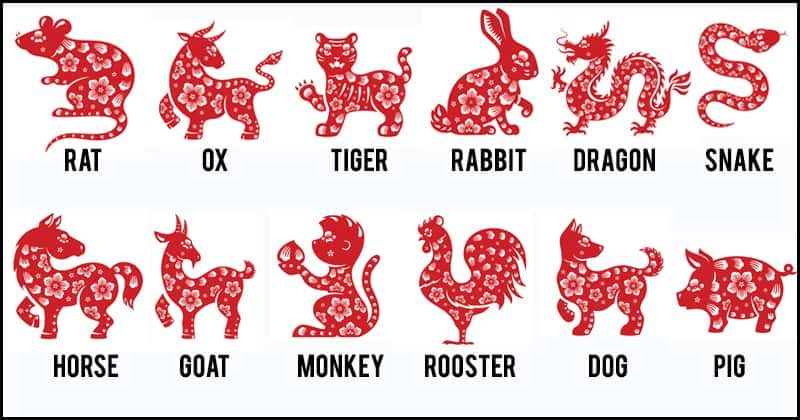
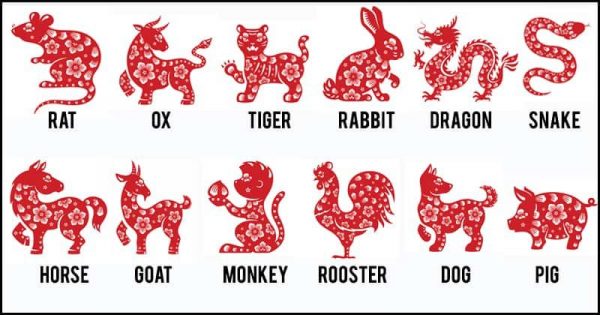
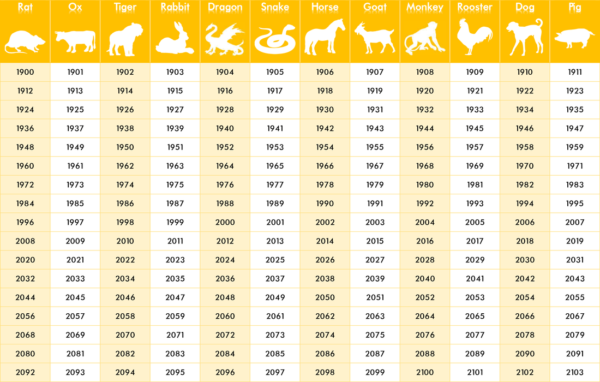
Are You Wondering How to Determine Your Chinese Zodiac Sign?
Use the handy table below to find your birth year and Chinese Zodiac Sign
Below are the 2021 Chinese Horoscope Forecasts for Those Who Live the Writing Life – Enjoy!
Note from Kiffer Brown: Chanticleer believes that we each make our own destiny by being optimistic and positive, by being kind and loving, by dreaming and inspiring, by being bold and doing, by helping and enriching others, by appreciating and being grateful, and by expanding our awareness of the Universe. Enjoy and have fun! Happy 2021!
If your sign is an Ox (Oxen are known to be leaders and loyal friends. They gain recognition through their hard work. They are also known for their reliability, thoroughness, strength, reason-ability, steadiness, and determination.) Bright, inspiring, patient, and hardworking are the OX’s attributes.
People born under the sign of the Year of the OX have traits of strength, reliability, fairness, and inspire confidence in others. While some may consider them strong-willed and stubborn, they are often thought to be calm, patient, and trustworthy.
2021 is the year to hone your writing craft and reinvigorate your book promotion strategy. Establish a budget for time and money for editing and marketing. Keep in mind nothing replaces your own elbow grease and hard work on your part.
Try to exercise more and move your body more while seated at your writing desk. Take care of yourself as well as you take care of others.
This will be the year when the chances for meeting a writing mentor improve. The mentor will help you to learn how to focus and make things happen. The mentor will point out opportunities that you may would not be able to see on your own. Exceptional opportunities will be coming your way, be prepared to employ them!
Click Here for PART-TWO where we post the Chinese Zodiac Horoscopes for the other eleven signs plus rituals for good luck.
Each year has a different sign, meaning each person is represented by one of the 12 animals.
We hope that you enjoyed this fun blog post that is meant as a way of thinking about new perspectives.
Chanticleer believes that we each make our own destiny by being optimistic and positive, being kind and loving, by dreaming and inspiring, being bold and doing, by appreciating and being grateful, and by expanding our awareness of the Universe.
The GLOBAL THRILLERS Book Awards recognizes emerging new talent and outstanding works in the genre of Lab Lit and Global Thrillers. The GLOBAL THRILLERS Book Awards is a division of Chanticleer International Novel Book Awards and Writing Competitions. (The CIBAs)
Chanticleer Book Reviews is looking for the best books featuring suspense, thrilling stories that put the balance of world power or that will end the world as we know it. We include with Global Thrillers the Lab Lit genre. Lab Lit is when Fiction Meets Real Science and Research or stories that are based on real science and research up to a certain “what if” point.
The Short Listers’ works will compete for the Semi-Finalists positions. Semi-Finalists will compete for FINALISTS positions.
The 22 divisions of the 2020 CIBAs’Grand Prize Winners and the Five First Place Category Position award winners will be announced at theApril 25th, 2021 Chanticleer International Book Awards Annual Awards Gala,which takes place at the Chanticleer Authors Conference that will be held in virtually Bellingham, Wash.
The 2020 Shortlist for the Global Thriller Book Awards
The 2020 GLOBAL THRILLER Book Awards Short-Listers
Matt Andrus – UFO
Lynn Yvonne Moon – The Agency – Tablet of Destinies
Avanti Centrae – Kiss of the Cobra – An M2 Action Thriller
Courtney Leigh Pahlke – Life Force Preserve; West End William
Gwen M. Plano – The Culmination, a new beginning
E. Alan Fleischauer – Just Die
Rafael Amadeus Hines – Bishop’s Law
Marc McGuire – Missions
William Mazanitis – The Daedalus Project
Domenick Venezia – Do No Harm
William Maz – A Cure for the Living
William Maz – The Bucharest Dossier
Erik Foge – One Way Roads
David Tunno – Intrepid Spirit
Tony Irvin – Waking the Sleepers
James G. Skinner – Samaritan Drug Lords
JL Morin – Loveoid
Randall Krzak – Colombian Betrayal
Good luck to all as your works move on to the next rounds of judging.
The ShortListers’ works will compete for the Semi-Finalists positions. Finalists will be selected from the Semi-Finalists, and then all Finalists will be recognized at the VCAC21 ceremonies. The First Place Category Winners, along with the CIBA Division Grand Prize winners, will be selected from the 22 CIBA divisions Finalists. We will announce the 1st Place Category Winners and Grand Prize Division Winners at the CIBAs Ceremonies April 21-25th, 2021 live at the luxurious Hotel Bellwether in Bellingham, Wash.
We are now accepting submissions into the 2021 GLOBAL THRILLER Book Awards writing competition. The deadline for submissions is October 21st, 2021. Please click here for more information.
As always, please do not hesitate to contact us with any questions, concerns, or suggestions at Info@ChantiReviews.com.
The M & M Book Awards recognize emerging new talent and outstanding works in the Cozy and Not-So-Cozy Mystery & Mayhem fiction genre. The M & M Book Awards is a division of the Chanticleer International Book Awards (The CIBAs).
Chanticleer International Book Awards is looking for the best books featuring “mystery and mayhem,” amateur sleuthing, light suspense, travel mystery, classic mystery, British cozy, not-so-cozy, hobby sleuths, senior sleuths, or historical mystery, perhaps with a touch of romance or humor, we will put them to the test and choose the best among them. (For suspense, thriller, detective, crime fiction see our Clue Awards, and for international intrigue see our Global Thriller Awards)
Congratulations to the M&M 2020 Shortlisters!
Good luck to all as your works move on the next rounds of judging.
Chris Karlsen –A Venomous Love
Susan McCormick –The Fog Ladies
Patrick M. Garry –The Discovery
Sigrid Vansandt –A Ghost’s Tale
Lori Roberts Herbst –Suitable for Framing
Cindy Sample –Dying for a Double
Christine A Brady –Don’t leave, Miss Riley
Sharon Clark –The Murder Cat
Elaine Orr –Demise of a Devious Suspect
D.R. Ransdell –Substitute Soloist
CB Wilson –Cavaliered to Death
P.K. Adams –Silent Water
Kari Bovee –Bones of the Redeemed
Kate Vale –Unanswered Questions
Michelle Cox –A Child Lost
Maria Ostrowski –Yet From Those Flames No Light
Prudence Ambergast –The Mystery at Fig Tree Hall
Ana T. Drew –The Murderous Macaron
Pat Camalliere –The Mystery at Mount Forest Island
Lina Hansen –In My Attic – A Magical Misfits Mystery
J.L. Anderson –Secrets of Willow Lane
Chuck Morgan –Crime Denied, A Buck Taylor Novel
Traci Andrighetti –Galliano Gold
Elizabeth Crowens –Dear Mom, The Killer is Among Us
Arlene McFarlane –Murder, Curlers & Kegs
Rita M Boehm –Missing on Maple Street
Mark Daniel Seiler –Shave Ice Paradise
Nellie H. Steele –The Secret of Dunhaven Castle
Nicole Asselin –Murder at First Pitch
Perry Miller –Lethal Injection
Mary Alice Kressler –Not So Silent Night
Elizabeth Crowens –Dear Bernie, I’m Glad You’re Dead
Lucinda Brant –Deadly Kin: A Georgian Historical Mystery
Nancy Good –Killer Calories, A Melanie Deming Manhattan Mystery
Carl and Jane Bock –The White Heron
Molly Flewharty –Short Line to Death
Betty Jean Craige –Saxxons in Witherston
Good Luck to All as Your Works Compete to Advance to the Next Level of the Chanticleer International Book Awards.
These titles are in the running for the Semi-Finalists of the 2020 M&M Book Awards for Cozy and Not So Cozy Mystery Novels.
The 22 divisions of the 2020 CIBAs’Grand Prize Winners and the Five First Place Category Position award winners will be announced at theApril 25th, 2021 Chanticleer International Book Awards Annual Awards Gala,which takes place at the Chanticleer Authors Conference that will be held in virtually Bellingham, Wash.
Good luck to all as your works move on to the next rounds of judging.
The ShortListers’ works will compete for the Semi-Finalists positions. Finalists will be selected from the Semi-Finalists, and then all Finalists will be recognized at the VCAC21 ceremonies. The First Place Category Winners, along with the CIBA Division Grand Prize winners, will be selected from the 22 CIBA divisions Finalists. We will announce the 1st Place Category Winners and Grand Prize Division Winners at the CIBAs Ceremonies April 21-25th, 2021 live at the luxurious Hotel Bellwether in Bellingham, Wash.
The Cygnus Book Awards recognize emerging new talent and outstanding works in the genre of Science Fiction, Steampunk, Alternative History, and Speculative Fiction. The Cygnus Awards is a genre division of Chanticleer International Book Awards and Novel Competitions (The CIBAs).
Chanticleer International Book Awards is looking for the best books featuring space, time travel, life on other planets, parallel universes, alternate reality, and all the science, technology, major social or environmental changes of the future that author imaginations can dream up for the CYGNUS Book Awards division. Hard Science Fiction, Soft Science Fiction, Apocalyptic Fiction, Cyberpunk, Time Travel, Genetic Modification, Aliens, Super Humans, Interplanetary Travel, and Settlers on the Galactic Frontier, Dystopian, our judges from across North America and the U.K. will put them to the test and choose the best among them.
The Short Listers’ works will compete for the Semi-Finalists positions. Semi-Finalists will be announced and recognized at the CAC21 banquet and ceremony. The Finalists will be selected from the Semi-Finalists.
The 22 divisions of the 2020 CIBAs’Grand Prize Winners and the Five First Place Category Position award winners will be announced at theApril 25th, 2021 Chanticleer International Book Awards Annual Awards Gala,which takes place at the Chanticleer Authors Conference that will be held in virtually Bellingham, Wash.
Congratulations to the 2020 Cygnus Book Awards SHORT LISTERS!
Brent Golembiewski –Flat Earth
Jonas Saul –The Immortal Gene
Tiffany Meuret –A Flood of Posies
R. Welsh – The Great Filter
Mark T. Sneed – Bully Nation
Brooke Skipstone – Some Laneys Died
B.T. Keaton – Transference
Mark D. Owen – Impact
JL Morin – Loveoid
Charis Himeda – CRISPR Evolution
Bryan K. Prosek – Paradoxal
R.S. Harmon – Captain’sCovenant
Liam King – Grit
Jim and Stephanie Kroepfl – Merged
Timothy S. Johnston – The Savage Deeps
Alex McIntosh – Upstream Revolt #6
Samuel Finn – A Voice From The Moon
Mike Meier – JoinWith.Me
Palmer Pickering – Moon Deeds
Ted Neill – Reaper Moon: Race War in the Post Apocalypse
C. Hofsetz – Enemy of the Gods #4
Dr. Anay Ayarovu – STAZR the World Of Z: The Dawn of Athir
PA Vasey – Trinity’s Fall
Rhett C. Bruno & Jaime Castle – The Luna Missile Crisis
William X. Adams – Alien Body
KeJo Black – A Kingdom in Shards
Denis Olasehinde Akinmolasire – The Mission to End Slavery
C.M. Aquavella – Transformation: The Circusity
J.T. Blossom – Lenore and the Problem With Love – When You Go to College Save the Planet
Alexander Usher – Experience Extracted
Russ Colson – The Arasmith Certainty Principle
Zach Fortier – Volk: Book one of The Overseer series
Cary Allen Stone – SEEDS: The Journey Begins
Susan Wingate – The Lesser Witness
Dennis M. Clausen – The Accountant’s Apprentice
Courtney Leigh Pahlke – Life Force Preserve
Marc Corwin – The Optical Lasso
Alan J. Steinberg – To be Enlightened
Michelle Tanmizi – Late Dawn
Good luck to all as your works move on the next rounds of judging.
The next round of judging will decide which books move on to the Semifinalist positions for the 2020 CYGNUS Book Awards for Science Fiction novels.
The ShortListers’ works will compete for the Semi-Finalists positions. Finalists will be selected from the Semi-Finalists, and then all Finalists will be recognized at the VCAC21 ceremonies. The First Place Category Winners, along with the CIBA Division Grand Prize winners, will be selected from the 22 CIBA divisions Finalists. We will announce the 1st Place Category Winners and Grand Prize Division Winners at the CIBAs Ceremonies April 21-25th, 2021 live at the luxurious Hotel Bellwether in Bellingham, Wash.
We are now accepting submissions into the 2021 CYGNUS Awards writing competition. The deadline for submissions is April 30th, 2021. The winners will be announced in April 2022.
Character, not plot, is what chiefly interests the reader because he translates and feels the character’s actions, desires, and passions from his own data bank of experiences and emotions. – Jessica Morrell
Long after the intricacies of a fictional plot fade from a reader’s memory, the characters lingerwith an almost physical presence, a twinkle of personality, unforgettable actions, and their happy or sad fates. Fictional characters whisper their secrets, allow us to witness their most intimate moments and sorrows, and trust us with their messy emotions, bad decisions, and longings. They penetrate our aloneness, populate our imagination by starring in our inner cinema, and slip their hands in ours and transport us to another place, another time. And while all this is going on, often they teach us what it means to be human complete with all the troubles, heartaches, and mysteries.
Benny, the unforgettable secondary character in “The Queen’s Gambit” by Walter Tevis
Characters that leave a lasting footprint in our memory range the gamut from stuck-on-themselves divas and difficult drama queens, to aging Italian billionaires and lonely singletons, along with knights and spies and waifs and dwarfs. It’s simple really: Character, not plot, is what chiefly interests the reader because he translates and feels the character’s actions, desires, and passions from his own data bank of experiences and emotions.
However, the book isn’t only about ‘bad guys’. It covers character roles and types including protagonists, heroes, unlikable protagonists, unreliable narrators, and a slew of information to add to your understanding.
I’ve been thinking about my book and all I’ve learned since I wrote it, because I’m creating a presentation on secondary characters for a virtual workshop I’m teaching at the Chanticleer Author’s Conference. Before I delve into techniques for creating secondary characters, I’m explaining the roles, hierarchy, development, and purposes of fictional players. Because the more you know about the many uses for characters –the enormous scope and weight they can bring to a story–the more tools you wield when playing God.
When I wrote my Bullies book as I sometimes call it, my main objective was to urge writers to take risks with their characters. To use shills and scapegoats and flamboyant loudmouths. Demon lovers, homicidal stalkers, criminal politicians. Stir in trolls, punks, bad asses, weirder-than-weird nerds, smarter-than-smart geeks, callous grifters, hard-to-believe they’re so foul-mouthed not-so-sweet old ladies.
A not-so-sweet old lady – Chrisjen Avasarla, UN Secretary – General of The EXPANSE SciFi series. She is always full of surprises.
Bring it on.
The same is true for your supporting cast. Sure you’ll add bit players, stock players, and archetypal players. Royals, innocents, mentors, warriors, and confidants. Burned-out cops, cranks, frenemies, crappy stepparents, and obnoxious neighbors. Familiar types with many valid, solid uses in storytelling.
And who could forget SPIKE from Notting Hill (1999)
It is said that the screenplay by Richard Curtis is funnier than the movie and more charming — if that is possible. -kb
Creating co-stars can be one of the great joys of storytelling. They can be outrageous, hilarious, freaky, maddening, sex-driven, drug-addled, and vapid. They can lie, steal, betray, enchant, and embolden. They sometimes get the best lines, spout the best snark. Give the best shade. They can drive their co-stars crazy and they can also drive the plot. They can star in their own subplots and often support the protagonist’s goals. Or thwart the protagonist’s goals. Or lie about supporting the protagonist while actually backstabbing the poor sod.
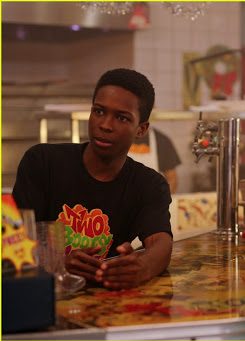
Boomer of “Dash and Lily’s Book Dares” – as acted by Dante Brown in the Christmas Mini-Series DASH and LILY BOOK of DARES
But like protagonists and antagonists, they can never be dull or commonplace. Never a pale footnote. Never thinly sketched unless the character has a walk-on part. But even bit players can possess physical characteristics. A lisp. A limp. An arresting voice. Inappropriate wardrobe choices and whisky breath.
I’m having a lot of fun thinking about this topic. Does it show?
Keep writing, keep dreaming, have heart. Jessica
Jessica Page Morrell
Jessica Morrell is a top-tier developmental editor and a contributor to Chanticleer Reviews Media and to the Writer’s Digest magazine. She teaches Master Writing Craft Classes at the Chanticleer Authors Conference that is held annually along with teaching at Chanticleer writing workshops that are held throughout the year.
Chanticleer Editorial Services – when you are ready
Did you know that Chanticleer offers editorial services?We do and have been doing so since 2011.
Tools of the Editing Trade
Our professional editors are top-notch and are experts in the Chicago Manual of Style. They have and are working for the top publishing houses (TOR, McMillian, Thomas Mercer, Penguin Random House, Simon Schuster, etc.).
If you would like more information, we invite you to email Kiffer or Sharon at KBrown@ChantiReviews.com or SAnderson@ChantiReviews.com for more information, testimonials, and fees.
We work with a small number of exclusive clients who want to collaborate with our team of top-editors on an on-going basis.Contact us today!
Chanticleer Editorial Services also offers writing craft sessions and masterclasses. Sign up to find out where, when, and how sessions being held.
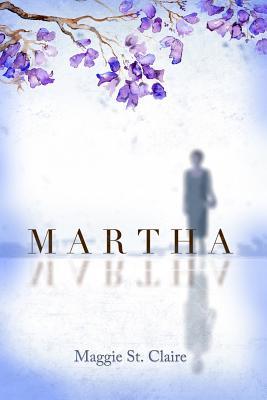
In the unique and compelling voice of an aging woman teetering on the edge of financial ruin, Maggie St. Claire’s debut novel, Martha, takes the reader from affluent residential areas of Los Angeles to its urban streets of despair, shadowing a 71-year-old, retired bank teller as she comes to grips with the challenges and adversities that threaten her existence.
This is the story of Martha Moore, many years divorced, estranged from her only child, and living a lie, as she enters her golden years. The most important things in her life, outside her pride in her desirable Hancock Park bungalow, are her book club friends. She attends their meetings dressed in her finest, projecting what she hopes is the image of a well-educated, well-to-do, Los Angeles dowager. The three wealthy women who comprise the remainder of the group are her best, perhaps only friends, and sometimes that’s a stretch.
In reality, anxiety and fear permeate her psyche as Martha struggles with uncertainty, failing health, food insecurity, and dwindling finances. Impoverished and alone, she is learning to live by her wits, filching food from many sources and raising money in unorthodox ways.
Martha’s handbag is filled with things from the kitchen that will never be missed when she leaves book club meetings and after times she volunteers at her church—she helps with the food bank and clothing donations, earning stars in her crown. She’s the sweet little old lady schmoozing her way to the buffet at local weddings and/or funerals, or the seasoned businesswoman whose nametag has been misplaced at conventions and rallies—a chameleon in sheep’s clothing, one might say.
Such events are her food sources. Of course, they don’t pay the overdue bills or the taxes. She worries how long it will be before she loses her home.
Then, seemingly, the planets align.
After finding her friend’s large emerald and diamond ring on the bathroom counter at a book club meeting, Martha sticks it in her pocket, intending to return it. Later, at home, she finds it still in her pocket. She had intended to return it—hadn’t she? Conflicted, she vacillates between fears of losing face or being thought of as a thief, and the urge to keep the ring until she can sell it and raise some badly needed cash. When she decides, the die is cast. She’ll sell the ring somewhere in one of the many jewelry venues abounding in the city.
Because she doesn’t dare, doesn’t know-how, and fears being found out, it was a fruitless decision until an indigent, young woman with her own problems enters Martha’s life. Then, everything changes …
Throughout the story, the direction of Martha’s life has been dictated by both changing circumstances and the choices they engendered. Ultimately, she must make a choice that will permanently change the rest of her life.
While the reader may “bump” out of the story by grammatical and formatting errors, they are drawn back in by the author’s complex characters, vivid imagery, and authentic dialogue and setting. In Martha, Maggie St. Claire has deftly chronicled troubling social issues that often go unnoticed in today’s world, within the context of one woman’s life.
More than just a good read, Martha is a relevant, provocative, and memorable story that lingers long after the book is closed.
Martha won First in Category in the CIBA 2019 Somerset Awards for Literary fiction.


 We are now accepting submissions into the 2021 Little Peep Awards Book Awards. The deadline for submissions is September 30th, 2021. The winners will be announced in April 2022.


 If your sign is a Rat (Along with being amiable and creative, Rats are known for their intelligence, adaptability, quick-wit, charm, artistry, gregariousness.)
 If your sign is an Ox (Oxen are known to be leaders and loyal friends. They gain recognition through their hard work. They are also known for their
 If your sign is a Rabbit (
 If your sign is a Dragon (They are known to be passionate and quick-witted along with having the following traits:
  If your sign is a Snake (The wise and almost mystical Snake is
  If your sign is a Horse (Independent and high-spirited, the Horse is a
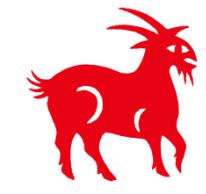 If your sign is a Goat (The artistic and compassionate Goat is
  If your sign is a Monkey (Confident and innovative, the Monkey is q
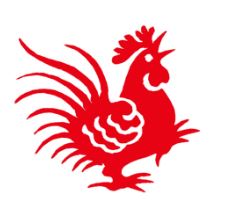 If your sign is a Rooster (Roosters are progressive thinkers and doers and unafraid to be different. They are known to be h
 If your sign is a Pig (Kind, friendly, and curious, the PIG is h



 The GLOBAL THRILLERS Book Awards recognizes emerging new talent and outstanding works in the genre of Lab Lit and Global Thrillers. The GLOBAL THRILLERS Book Awards is a division of Chanticleer International Novel Book Awards and Writing Competitions. (The CIBAs)



 The Cygnus Book Awards recognize emerging new talent and outstanding works in the genre of Science Fiction, Steampunk, Alternative History, and Speculative Fiction. The Cygnus Awards is a genre division of Chanticleer International Book Awards and Novel Competitions (The CIBAs).





 In the unique and compelling voice of an aging woman teetering on the edge of financial ruin, Maggie St. Claire’s debut novel, Martha, takes the reader from affluent residential areas of Los Angeles to its urban streets of despair, shadowing a 71-year-old, retired bank teller as she comes to grips with the challenges and adversities that threaten her existence.